

My Emails, My Server... and Microsoft in the Middle

I was quietly working on improving the autoconfiguration mechanisms for the mailboxes hosted on my servers: Outlook, Thunderbird, Apple... a good opportunity to check that all of them were correctly finding their settings.
Out of curiosity, I decided to see how the client now offered with Windows 11 behaved: New Outlook.
I thought it would be a five-minute test.
Instead, it mostly revived a few thoughts about our data, the choices made on our behalf, and what it still means to use an "independent" service in 2026.
First surprise: Microsoft wants to put itself in the middle
So I add an address hosted on my own server.
New Outlook detects that it is an IMAP account and shows me this:
To add your IMAP account to Outlook, you need to sync your emails with Microsoft Cloud.
Excuse me?
IMAP is a standard protocol that allows an email client to access messages stored on a server. It absolutely does not need Microsoft's cloud to work.
Classic Outlook has been doing it for years.
Thunderbird does it.
A phone does it.
Pretty much any normally functioning IMAP client can do it.
The traditional model is fairly simple:
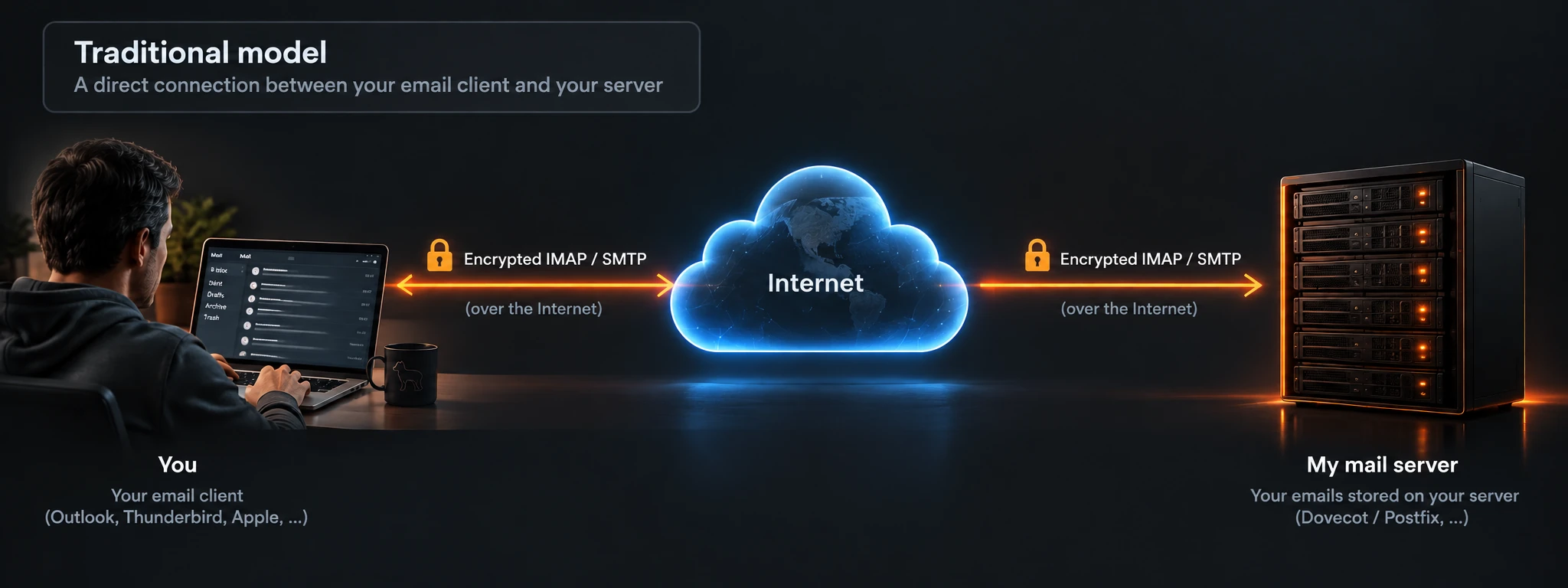
With New Outlook, Microsoft introduces a new actor into that relationship:
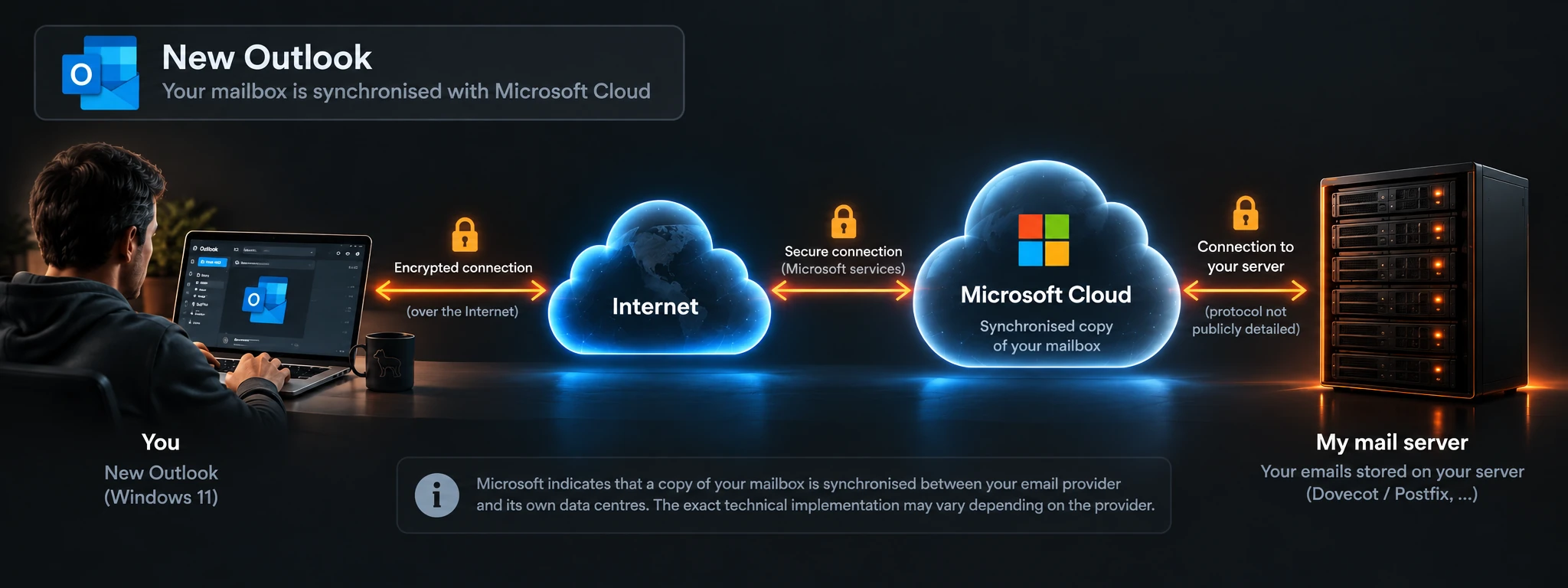
Microsoft has its reasons for designing New Outlook this way. Synchronizing through its cloud allows it, among other things, to provide third-party accounts with certain features integrated into the Outlook ecosystem.
I can understand that logic.
What bothers me much more is the way it is presented.
The screen says:
You need to sync your emails with Microsoft Cloud.
You need to.
For someone who simply wants to read their email, the message seems pretty clear: this is mandatory.
Yet the screen explains practically nothing.
Why does New Outlook require this synchronization?
Which features depend on it?
What data will be synchronized?
What does that imply?
And what are my alternatives if I do not want it?
These are precisely the kinds of things I think should be explained before asking someone to introduce a new actor into the handling of their email.
Microsoft states that a copy of the mailbox data is synchronized between the email provider and its own data centers.1
And I am clearly far from the first person to ask these kinds of questions. The way New Outlook handles third-party IMAP accounts has raised questions and debate since its arrival, particularly among administrators and users who deliberately chose to host their email outside the Microsoft ecosystem.
The same questions keep coming back: what data actually passes through Microsoft Cloud, how are the credentials used to access the original server handled, and why can't we simply keep a direct IMAP connection?
I have no intention of revisiting several years of debate around New Outlook. But if even knowledgeable users are questioning the implications of this architecture, how can a simple “You need to sync your emails with Microsoft Cloud” be considered a sufficient explanation for the general public?
I would have far fewer objections to a screen saying something like:
Some New Outlook features require your mailbox to be synchronized with Microsoft Cloud.
Here is why, here is what that means, and here are your alternatives.
Then we would have an informed choice.
So the problem is not that Microsoft offers its cloud.
The problem is that a decision that may have implications for how our data is handled is presented as a simple necessary step in configuring a mailbox, without really explaining why or what we are agreeing to.
Second surprise: Outlook knows my login better than I do
I continue the test anyway.
And I come across something even more surprising.
On my servers, an email address is not necessarily the identifier used to authenticate.
That is intentional.
An address such as:
john.doe@example.com
may perfectly well use an identifier such as:
jdoe42
They are two different pieces of information. Keeping them separate adds a modest extra layer of protection.
An email address is, by its very nature, information we share. It ends up in address books, on websites, in databases and, unfortunately, sometimes in data breaches.
If that address is automatically also the account identifier, someone who knows it already has one of the pieces of information needed to attempt to authenticate.
On my systems, that is deliberately not always the case.
Obviously, this is no substitute for a strong password, rate limiting, or other security mechanisms.
It is simply one more piece of information that I see no reason to hand to an attacker for free.
New Outlook has a different opinion.
In its advanced IMAP configuration, I can choose the server.
I can choose the port.
I can choose the encryption type.
I can enter my password.
But I cannot choose my username.3
New Outlook has decided that my email address is my IMAP username.
And if my server disagrees?
Too bad for my server.
And then comes SMTP...
This is where the story becomes genuinely funny.
A few lines further down, New Outlook asks me for the settings of the server responsible for sending my messages.
And what do we find there?
SMTP username.
A perfectly editable field.
So New Outlook understands this perfectly well:
email address ≠ SMTP username
but its interface does not allow me to do this:
email address ≠ IMAP username
I am still looking for the logic.
In any case, this is not an intrinsic limitation of the protocols involved.
And above all, old Outlook was perfectly capable of handling this kind of configuration.
So with its successor, we have lost a perfectly valid capability that existed before.
Unfortunately, this isn't just a geek test
The most annoying part is that I already knew about this limitation.
I had encountered it with a customer.
Following a change in her Windows environment, the email client she had been using until then had become unusable. The solution that naturally presented itself was New Outlook.
Her mailbox worked.
The server worked.
Her credentials worked.
But her email address and her IMAP username were different.
And New Outlook simply did not allow that username to be entered.
She eventually had to migrate to another email client.
Which, in retrospect, may not have been such a bad thing.
But that experience mainly illustrates the problem that bothers me here.
When New Outlook talks to me about synchronization with Microsoft Cloud, I immediately understand that something rather different from a simple connection to my server is happening.
I know what IMAP is.
I know what SMTP is.
I know that a cloud intermediary is not inherently required for them to work.
I also know that other email clients exist.
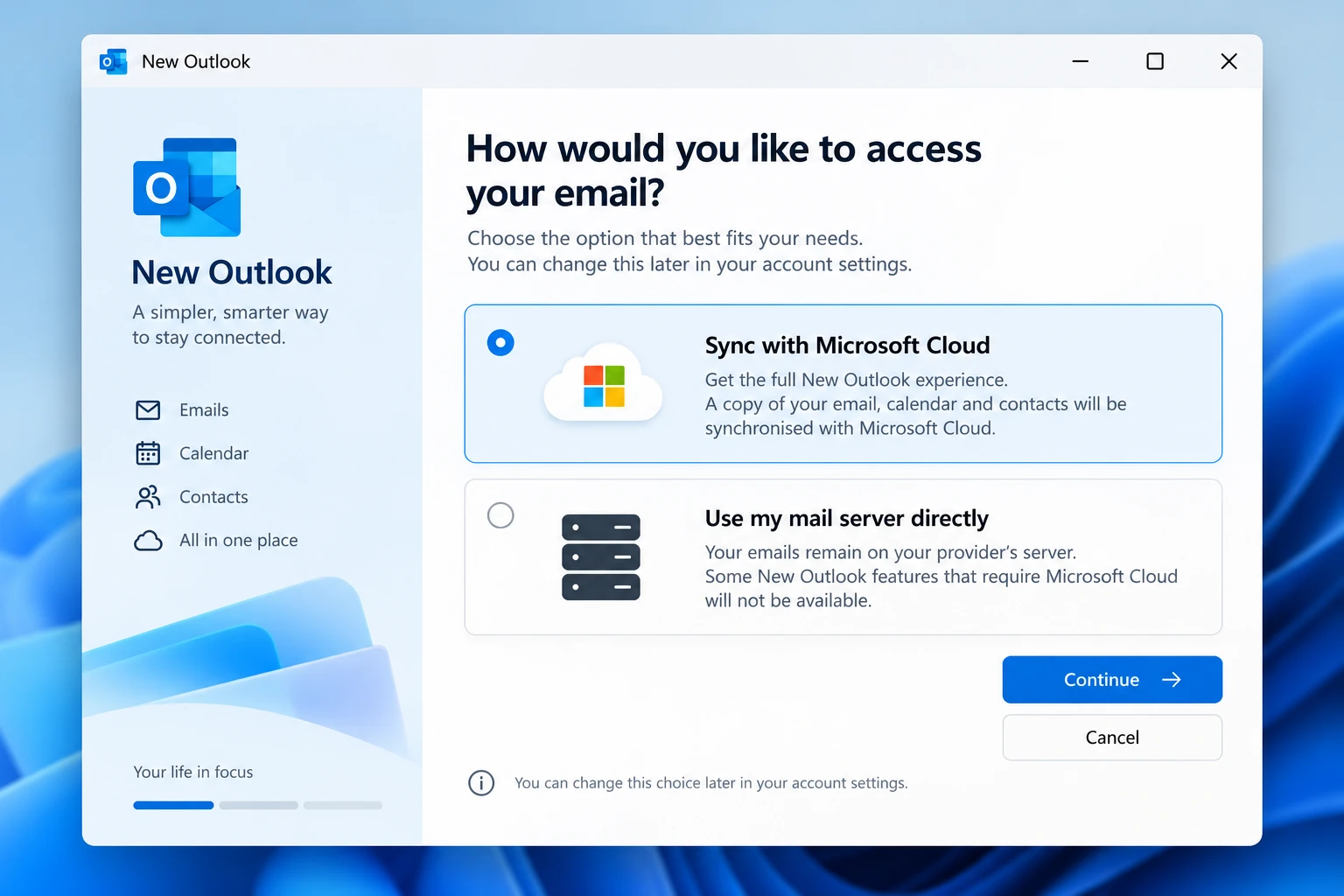
The ordinary user simply wants to read their email.
They buy a Windows computer.
They open the email software they are offered.
They enter their address.
The software tells them that they need to synchronize their emails with Microsoft Cloud.
They click Continue.
How many users actually have the technical knowledge required to understand the choice they have just accepted?
And can we really blame them for not having it?
Making technology invisible
We spend a great deal of time trying to make technology simpler.
And that is an excellent thing.
Nobody should need to know the difference between IMAP and SMTP, understand what STARTTLS is, or memorize port 993 simply to read their email.
Autoconfiguration exists precisely for that reason.
You provide your address and password, and the software takes care of the rest.
Perfect.
But that simplification also gives a great deal of power to whoever designs the interface.
The user no longer sees the technical decisions.
They do not necessarily see which servers are being contacted.
They may not know where their data passes through.
They trust the software to make reasonable decisions on their behalf.
And that is precisely why some decisions should not become invisible.
The more invisible technology becomes to the user, the greater the responsibility of those who design it to make the choices that matter visible.
Simplifying technology should not mean simplifying consent.
And what about digital sovereignty?
The subject takes on a particular flavor at a time when we are talking more and more about digital sovereignty, data location, and dependence on a handful of gigantic technology companies.
We often imagine these questions at the scale of governments or large companies.
But they also exist on a much more ordinary scale.
Someone may choose to entrust their email to a small local company.
To their employer.
To an association.
To a European provider.
Or even to host it themselves.
They may make that choice precisely because they do not want to entrust their mail to Microsoft, Google, or another web giant.
And yet the simple choice of software used to access that mailbox can reintroduce one of those actors into the equation.
That is quite a paradox.
Hosting your own email in 2026 is, incidentally, almost an act of masochism.
You have to manage servers, DNS, certificates, SPF, DKIM, DMARC, antispam, IP-address reputation, backups, security, and a few other delights.
If someone willingly accepts all of that rather than creating a free mailbox with a web giant, there is a good chance that control over their infrastructure and data is part of their motivation.
And then a simple email client can decide that an additional intermediary should nevertheless be part of the story.
The problem still isn't the cloud
I have nothing against cloud services as such. Nor am I claiming that open-source software is automatically virtuous while Microsoft software is automatically bad. That would be far too simplistic.
If Microsoft can provide better Outlook features by synchronizing a third-party mailbox with its infrastructure, fine.
Let that option exist.
Let it even be offered by default.
But explain clearly what it provides.
Explain what it implies.
And let me decide whether I want it.
A good interface could simply say:
Sync with Microsoft Cloud
Enables all New Outlook features.
and also offer:
Use my server directly
Some features requiring Microsoft Cloud will be unavailable.
Most users could choose the first option without ever having to know what IMAP is.
The user who wants to keep a direct connection could choose the second.
Everyone wins.
Simplifying is not deciding for us
That is ultimately what bothers me most about this experience.
Microsoft is probably trying to make email configuration simpler for millions of people.
The intention is perfectly understandable.
But there is a fundamental difference between:
hiding unnecessary complexity
and
removing a choice because most users would not know it exists.
That is all the harder to accept here because classic Outlook allowed more traditional configurations.
The technical capability has not disappeared from email.
The product has changed its philosophy.
And when software occupies such a natural place in the computing environment of the general public, I think it should be particularly careful about this kind of choice.
Not because every user will want to change it.
But because most will not even know that the choice was made for them.
So, which email client should you use?
Fortunately, New Outlook is not the only way to access your email on Windows.
Among mainstream alternatives, Thunderbird is probably the best known: free, open source, and cross-platform. eM Client, meanwhile, offers a fairly polished and accessible commercial approach. Both can work with traditional IMAP accounts while preserving control over their settings.
Neither is perfect, and there are obviously other solutions. The point here is not to crown the best email client.
Quite the opposite: the point is to remember that we have a choice.
Thunderbird will not suit everyone. Some alternatives are commercial. Others put more emphasis on integrating online services. And the needs of someone who simply uses an IMAP mailbox are not necessarily the same as those of a professional user working with Microsoft 365 all day.
And there is another rather amusing player in this story: Outlook itself.
Not New Outlook.
Microsoft 365's classic Outlook, which I still use professionally.
It still lets me configure my accounts in the traditional way. I can choose my servers, use a username different from my email address, and maintain a direct relationship with my infrastructure when I want to.
In other words, Microsoft still offers its professional customers capabilities that its new consumer-oriented client has chosen to simplify or remove.
For now, at least. Microsoft says it will continue supporting existing installations of classic Outlook until at least 2029, although that does not guarantee that every current feature will remain unchanged.4
And that difference raises an interesting question of its own.
Why would a professional user need to retain that level of control while a private individual could supposedly do without it?
Perhaps simply because the constraints and expectations are different. Perhaps also because it is much harder to impose certain changes on companies that have existing infrastructure, security policies, and administrators capable of assessing the consequences.
I do not have the answer.
But the contrast is worth noting.
So I will continue to use classic Outlook professionally for as long as it meets my needs. And for someone simply looking for an independent email client, I would suggest looking at Thunderbird and the other available alternatives rather than automatically accepting whatever Windows puts in front of them.
Because the choice of where our data resides and how we access it should remain ours.
Microsoft is perfectly entitled to offer me its cloud.
It can explain why it believes my experience will be better with it.
It can warn me that some features will be unavailable if I choose not to use it.
But one particularly important word should remain part of that conversation:
No.
My email.
My server.
And if I want it that way,
nobody in the middle.
Update
2026-10-13: Revised wording, verified technical information and added documentary references.
Notes
Footnotes
-
Microsoft Support, “Sync your account in Outlook to the Microsoft Cloud”. Microsoft explains that a copy of account data is synchronized to its data centers. The list of supported providers on this page is not fully consistent with all of Microsoft's other New Outlook documentation. ↩
-
Dirk Knop, Ronald Eikenberg and Stefan Wischner, Heise/c’t, November 10, 2023, “Microsoft lays hands on login data: Beware of the new Outlook”. The investigation observed account settings and credentials being transmitted to Microsoft's servers over TLS. It did not establish how those credentials are stored internally. ↩
-
Microsoft Q&A, July 22, 2025, “How to setup IMAP account with separate username and email address for receiving email with new Outlook?”. A moderator confirmed that New Outlook does not provide a field for an IMAP username different from the email address. ↩
-
Microsoft Learn, “Stages of migration to new Outlook for Windows”. Microsoft states that eligible existing installations of classic Outlook will remain supported until at least 2029. ↩
Comments
No comments yet.
Add a comment