
ZHA or Zigbee2MQTT: Which One Should You Choose?
To connect my first Zigbee switches to Home Assistant, I first needed... Zigbee. And without a dongle, there was no Zigbee network: the dongle acts as the coordinator, forming the network that devices join. Before getting into the software, a quick word about the hardware.
The dongle
I ordered a SONOFF Zigbee 3.0 USB Dongle Plus (ZBDongle-E), based on a Silicon Labs EFR32MG21 chip. Nothing particularly scientific about that choice: the price seemed reasonable for an experiment, the reviews were very good, and it appeared to be widely used with Home Assistant. Three months later, I still have no reason to regret it.
A few pointers for anyone considering the same dongle:
It comes with Zigbee coordinator firmware (EmberZNet) and works out of the box with both ZHA and Zigbee2MQTT.1
The chip supports multiple protocols: it can also handle Thread, provided you flash it with different firmware (Thread-only, or MultiPAN to combine the two). The manufacturer provides a flashing tool for this.2 I haven't ventured down that road: my dongle does Zigbee, and I'm perfectly happy with that.
One caveat, though: Zigbee2MQTT doesn't support that multiprotocol firmware. If you want to run several protocols alongside Zigbee2MQTT, the recommendation is to use a separate adapter for each protocol.3
Other dongle families exist, notably those based on Texas Instruments chips (CC2652), such as SONOFF's ZBDongle-P. Zigbee2MQTT long favoured those adapters, while Silicon Labs chips were once considered experimental. That is no longer how the current documentation presents them: both families are listed, although you can still find older opinions saying otherwise.4
The only thing I probably would have liked to know at the time was that solutions designed to cover both Zigbee and Thread existed. Would that have changed my choice? I'm not even sure.
Right. I Have a Dongle. Now What?
Once the dongle was installed — and after a few little adventures getting USB passthrough working all the way through to my Home Assistant VM — another question came up: ZHA or Zigbee2MQTT?
ZHA is integrated directly into Home Assistant. Plug in a compatible coordinator, Home Assistant detects it, and you configure your Zigbee network from the interface. Simple.
Zigbee2MQTT requires a few extra building blocks: you install Zigbee2MQTT, set up an MQTT broker (Mosquitto in my case, which is also the one recommended in its documentation), then connect the whole lot to Home Assistant.5
Seen like that, the choice seems fairly obvious. Why make life more complicated?
Except...
After a little research, I quickly realised that plenty of Home Assistant users had opted for Zigbee2MQTT. And when lots of people deliberately choose the route that requires a bit more tinkering, I tend to wonder why.
There is probably some historical legacy behind that. Zigbee2MQTT has long had a reputation for supporting a very broad range of devices and offering extensive configuration options. But comparisons found on the Internet need to be treated with caution: they age quickly.
ZHA has evolved considerably. Today, it supports Zigbee groups, direct bindings between devices, OTA updates and network backups.6 It can also migrate a network to another coordinator, within the limits of the supported radios (Silicon Labs, Texas Instruments, ConBee/RaspBee).7 In other words, many of the historical arguments in favour of Zigbee2MQTT deserve another look today. For many users, ZHA will be a very good choice.
There is, however, a genuine architectural difference: Zigbee2MQTT can run as an independent service, while ZHA lives inside Home Assistant. When Zigbee2MQTT is hosted separately, it remains operational while Home Assistant restarts. The Zigbee network continues to be managed, even though automations that depend on Home Assistant are unavailable during the interruption. Direct bindings between Zigbee devices, meanwhile, can work without either software component. In a virtual-machine setup like mine, USB passthrough to the VM also deserves attention: Zigbee2MQTT has no automatic advantage here if both setups rely on the same passthrough. The separation really comes into its own when Zigbee2MQTT runs elsewhere or uses a network-connected coordinator.8
So I still haven't found a definitive answer to the question, “Which one is better?” I'm increasingly convinced that it simply isn't the right question.
A Question of Architecture
There was, however, something about Zigbee2MQTT that appealed to me more. With ZHA, the whole thing looked to me like a relatively monolithic solution integrated into Home Assistant. With Zigbee2MQTT, I saw something more like this:
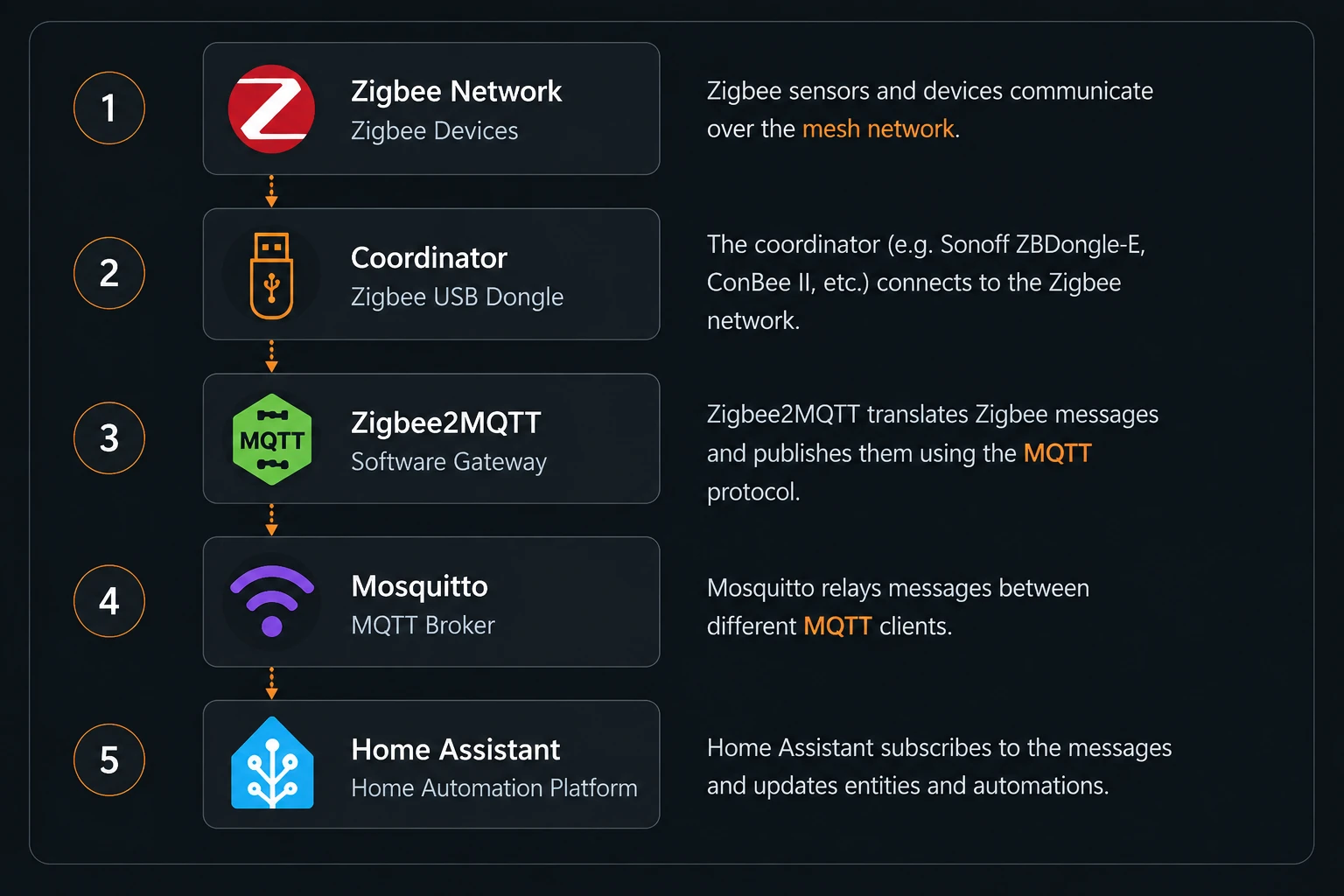
More pieces. So, objectively, more things to install, configure, monitor... and potentially break.
Curiously, that was also part of what I liked about it. Each building block had a role I could identify: Zigbee2MQTT handled the Zigbee network, Mosquitto carried the MQTT messages, and Home Assistant made use of them. Probably my slightly twisted side showing, or simply a preference for architectures where I can see fairly clearly who is talking to whom.
And What About MQTT?
MQTT obviously isn't limited to Zigbee2MQTT. Once you have a Mosquitto broker running, there's nothing stopping you from connecting other applications, sensors or services to it. At the time, I didn't necessarily need any of that, but I liked the idea of adding a reusable building block rather than a component serving just one purpose.
Since then, other things have indeed started using Mosquitto. That doesn't prove Zigbee2MQTT was the better choice. It simply means that, in my case, the architecture that appealed to me eventually found other uses.
So, ZHA or Zigbee2MQTT?
If someone asked me that question today without giving me any other context, my answer would be: start with ZHA. It's integrated directly into Home Assistant, there are fewer components to install and maintain, and if your goal is to add Zigbee devices to your setup, it's probably the most straightforward route.
I'd take a closer look at Zigbee2MQTT in a few situations.
If MQTT is already part of your infrastructure. If you have an active Mosquitto broker — perhaps because several services running in Docker containers already publish data to it — adding Zigbee2MQTT feels quite natural. The broker is there, it's configured, you know why it's there, and Zigbee2MQTT becomes just another building block.
If you want to keep the roles separate. Having your Zigbee network management remain operational while Home Assistant restarts is a genuine argument in its favour.
If you enjoy taking the machinery apart to see how it works. In my view, Zigbee2MQTT is worth the effort, but it does require a little more time: more components to understand, more settings to explore, more things to monitor. For some people, that's precisely the attraction.
Conversely, installing Zigbee2MQTT and an MQTT broker solely to connect a handful of switches to Home Assistant adds complexity you may not need.
The choice, then, doesn't just depend on what Zigbee2MQTT can offer. It also depends on what you already have and what you intend to do with it.
What If I Change My Mind?
I get the feeling that nothing is set in stone: if you pick the wrong path, you can always change your mind later, even if it takes a little tinkering. One thing, however, is well documented: switching dongles is more straightforward with ZHA, which provides a built-in migration wizard. With Zigbee2MQTT, coordinator backup and restore are supported for EmberZNet and zStack adapters,9 but migration is more manual and depends on the adapters involved. In some cases, it may require additional steps or even re-pairing certain devices.10
Either way, making a full Home Assistant backup before changing anything is a good idea.
And Me?
I was starting almost from scratch with Zigbee. I didn't already have an ecosystem full of MQTT components that would have made Zigbee2MQTT the obvious choice. And yet I chose Zigbee2MQTT.
Three months later, can I say it was the best choice? No. Have I found any reason to switch to ZHA? No either. I still like the architecture, Mosquitto has since found other things to do, and my Zigbee devices work. For now, that's more than enough for me.
And if I had to recommend something to someone starting today? ZHA by default, then Zigbee2MQTT once you have a reason to choose it.
Even if, apparently, some of us prefer to start with the solution that has more pieces. Probably because it gives us more things to understand.
Updates
2026-10-14: Revised the text, updated the technical information and added references.
Notes and References
Sources consulted in October 2026. Community discussions reflect their authors' views and may evolve; the official documentation of each project remains the primary reference.
Footnotes
-
The ZBDongle-E comes pre-flashed with EmberZNet-based Zigbee coordinator firmware and works with both ZHA and Zigbee2MQTT. For the chip specifications (Silicon Labs EFR32MG21, Zigbee 3.0 and Thread), see CNX Software, “Sonoff ZBDongle-E Zigbee 3.0 USB dongle features EFR32MG21 MCU with +20dBm radio”: https://www.cnx-software.com/2022/08/05/sonoff-zbdongle-e-zigbee-3-0-usb-dongle-features-efr32mg21-mcu-with-20dbm-radio/ ↩
-
SONOFF's ZBDongle-E documentation explains that the dongle can be re-flashed using the official tool to act as a Zigbee router, a Thread coordinator (OpenThread RCP firmware) or a MultiPAN coordinator: https://help.sonoff.tech/docs/zbdongle-e/. See also SONOFF's MultiPAN guide for Home Assistant: https://sonoff.tech/blogs/news/how-to-use-multipan-in-home-assistant-with-sonoff-zbdongle-e ↩
-
Zigbee2MQTT documentation, “EmberZNet adapters (Silicon Labs)”: multiprotocol firmware is not supported; the recommended alternative is to use one adapter per protocol. The page also specifies the adapter driver (
adapter: ember): https://www.zigbee2mqtt.io/guide/adapters/emberznet.html ↩ -
Zigbee2MQTT, “Supported Adapters”: both zStack (Texas Instruments) and EmberZNet (Silicon Labs) adapters are listed: https://www.zigbee2mqtt.io/guide/adapters/. For historical context — the deprecated
ezspdriver being replaced byember, Silicon Labs chips previously being considered experimental, and the preference for TI chips — see this older Home Assistant community discussion about the ZBDongle-E: https://community.home-assistant.io/t/itead-s-sonoff-zigbee-3-0-usb-dongle-plus-v2-model-zbdongle-e-based-on-silicon-labs-efr32mg21-radio-soc-mcu/442695/351. This is a dated community account from before theemberdriver stabilised. ↩ -
Zigbee2MQTT, “Getting started”: an MQTT broker is required, and Mosquitto is recommended: https://www.zigbee2mqtt.io/guide/getting-started/ ↩
-
Official Home Assistant documentation, “Zigbee Home Automation”: Zigbee groups, direct bindings, OTA updates and Zigbee network management: https://www.home-assistant.io/integrations/zha/ ↩
-
Official Home Assistant ZHA documentation: backup and migration of compatible coordinators through the radio migration features. Exact capabilities depend on the adapters: https://www.home-assistant.io/integrations/zha/ ↩
-
Official Home Assistant ZHA documentation: https://www.home-assistant.io/integrations/zha/. Zigbee2MQTT installation and configuration documentation: https://www.zigbee2mqtt.io/guide/installation/. The service can remain available during a Home Assistant restart only if it is hosted independently; Zigbee bindings are a feature of the Zigbee network itself. ↩
-
Official Zigbee2MQTT FAQ, “How do I migrate from one adapter to another?”: backup and restore are supported for
zstackandemberadapters: https://www.zigbee2mqtt.io/guide/faq/ ↩ -
Official Zigbee2MQTT FAQ, “How do I migrate from one adapter to another?” and “What does and does not require re-pairing of all devices?”: coordinator replacement procedures and limitations when migrating between adapter families: https://www.zigbee2mqtt.io/guide/faq/ ↩
Comments
No comments yet.
Add a comment