
My Local AI Model: 8 GB of VRAM, 9 Billion Parameters, Zero Insecurity
How far can you go with a local 9-billion-parameter AI model and just 8 GB of VRAM? Tests, reasoning, RAG, Home Assistant, quantization, and a few surprises.
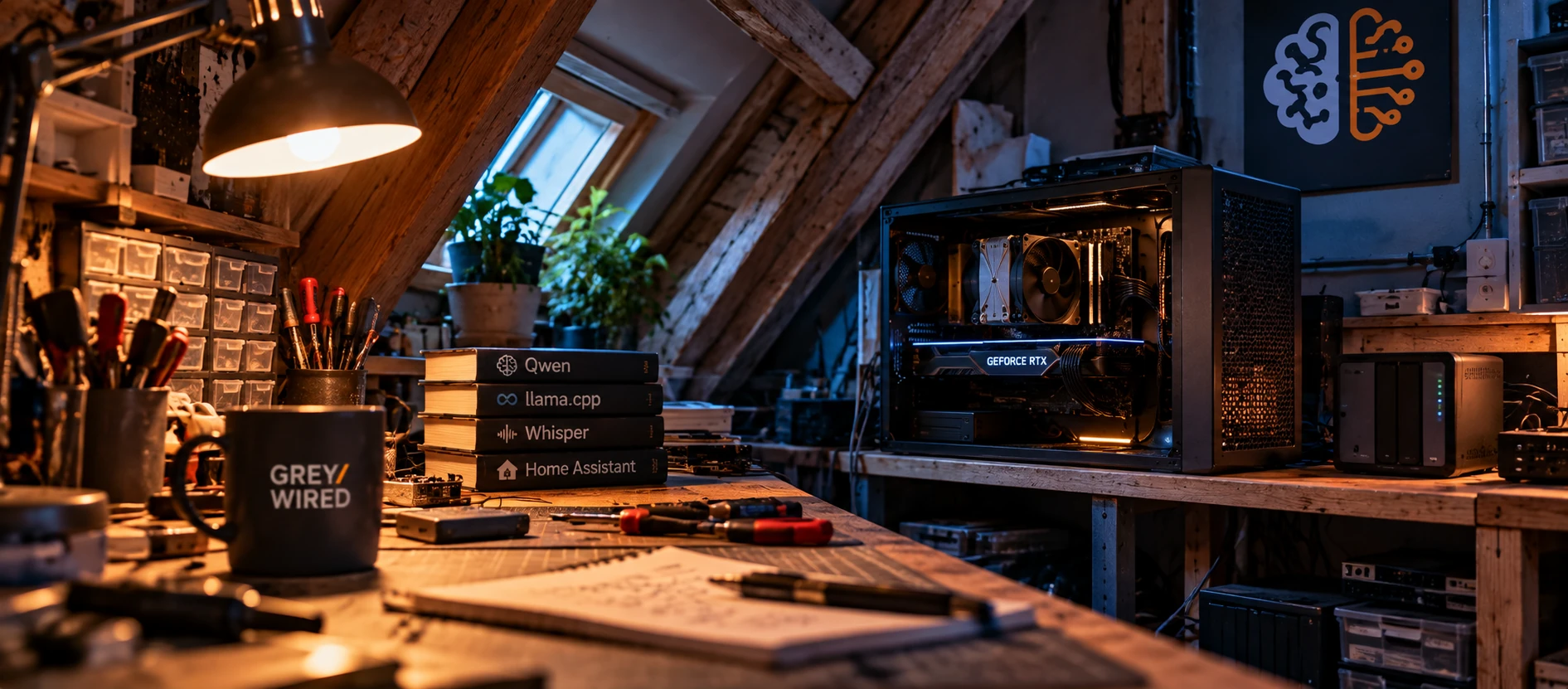
I'll be honest: what follows probably won't be relevant to everyone, but it may give some people a few ideas. I'm not even sure that, today, investing in a machine dedicated solely to running an AI model at home makes much sense.
Then again...
I'll come back to that.
You can also reasonably ask what value a "small" local model has compared with ChatGPT or Claude, without even mentioning the Chinese competitors that are no longer far behind (including the Qwen I use, developed by Alibaba). It's a perfectly legitimate question. And yet, for some time now, a 9-billion-parameter model has been running in my home.
It isn't there to replace ChatGPT, nor to compete with the largest online models. It's there for something else.
Perhaps the real question isn't what a small model can do, but how far you can take it before its size genuinely becomes a limitation.
"Small" has become very relative
Nine billion parameters may seem insignificant next to the models behind the major online services, but small models are improving extremely quickly. And that's not just an impression.
When Qwen3 was released in 2025, its creators reported, for example, that the small Qwen3-4B could rival their previous Qwen2.5-72B-Instruct. More generally, according to their evaluations, the dense Qwen3 models achieved performance comparable to significantly larger Qwen2.5 models.1
It would obviously be absurd to turn that into a rule such as "a 9B model from 2026 equals a 36B model from 2024." Benchmarks (standardized test suites used to compare models), architectures and training methods differ, and a small model that catches up with a larger one on one task can still lag far behind on another.
But the trend is real: the number of parameters required to reach a given level of performance is falling rapidly across many use cases.
The Qwen3.5-9B I use is a good illustration: its official model card reports, among other scores, 82.5 on MMLU-Pro, 81.7 on GPQA Diamond and 91.5 on IFEval, benchmarks that respectively measure general knowledge, scientific reasoning and instruction-following ability.2
So "small" clearly no longer means "gimmick." A model of this size can already summarize a document, translate text properly, extract information from it, produce structured data, interpret a request in natural language or serve as the engine for a fully local RAG.
Rather than simply claiming that, I might as well test it.
A few very simple tests
I started with something almost trivial: translating a short passage from French into English. I submitted exactly the same text to ChatGPT and to my local Qwen. All the tests in this article were carried out on September 30, 2026, using the versions of ChatGPT and Claude available on that date.
The result: both translations were strictly identical, word for word.
That obviously doesn't prove that a 9-billion-parameter model is equivalent to a frontier model. It shows something more interesting: for this particular task, the difference in capability simply didn't matter.
There was one notable difference, though: time. ChatGPT answered almost immediately. My little Qwen took 1 minute and 33 seconds.
Yet raw generation speed wasn't the problem, since it was producing around 70 tokens per second (tokens are the small chunks of words that the model reads and writes). But to translate those two sentences, it had produced 6,582 tokens, almost entirely devoted to its internal reasoning.
So I ran exactly the same test again with reasoning disabled. This time: 58 tokens, 0.8 seconds. The translation was no longer strictly identical to ChatGPT's, but it was still perfectly correct.
I then tried a small energy problem requiring several calculation steps. Same observation: the model found the correct answer in both cases, but it needed 3,506 tokens and 48 seconds with reasoning, versus 1,054 tokens and 14 seconds without it.
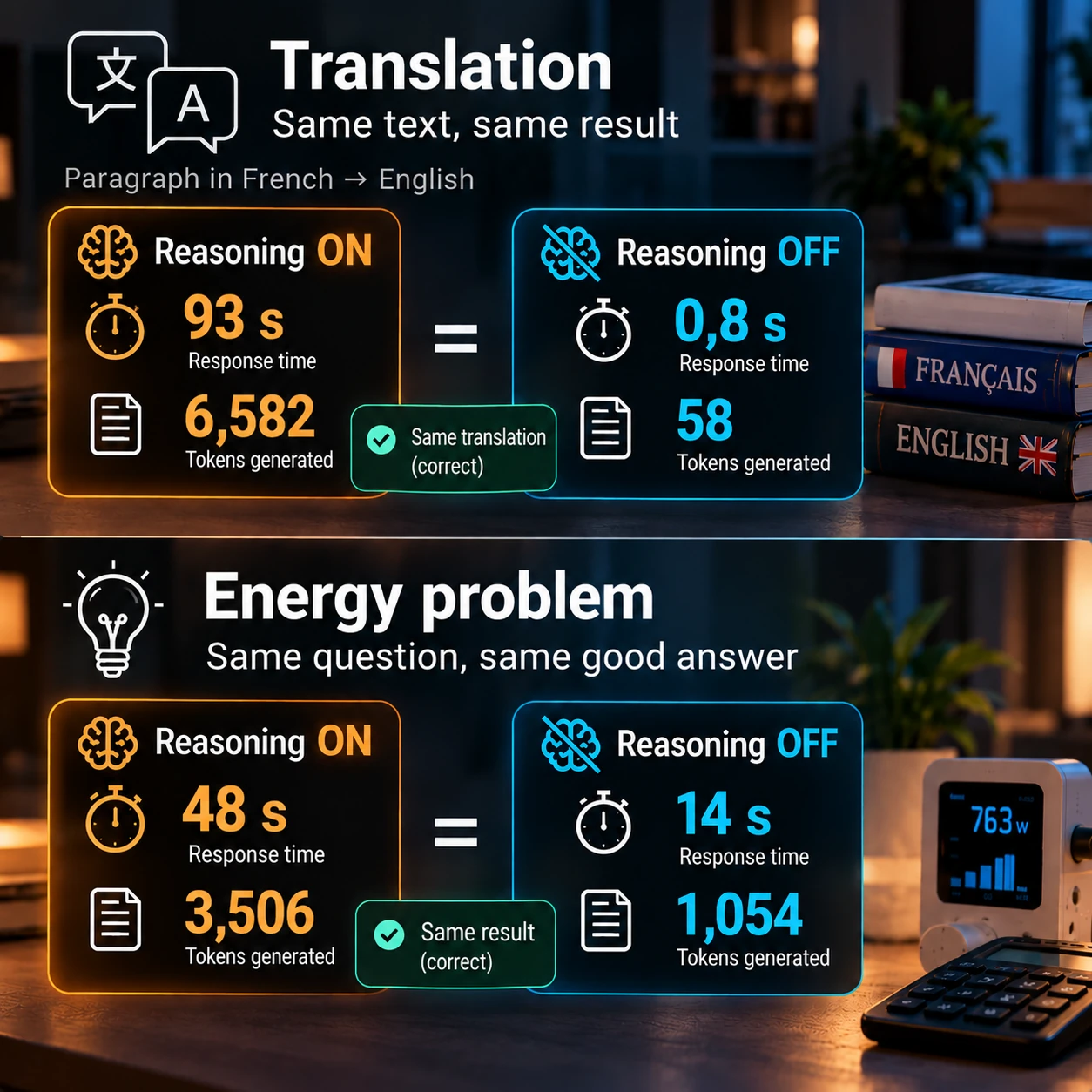
This doesn't mean reasoning is useless: on a complex problem, it can make all the difference. But these two tests suggest that there is no need to mobilize the model's full reasoning capacity for every task.
That's particularly important with a local model. Optimizing inference isn't only about gaining a few tokens per second: it's also about not generating thousands of tokens you never needed in the first place.
I then gradually made the questions more difficult: electricity-consumption calculations, multi-step reasoning, ambiguities, and finally deliberately missing information. That's where the differences became interesting.
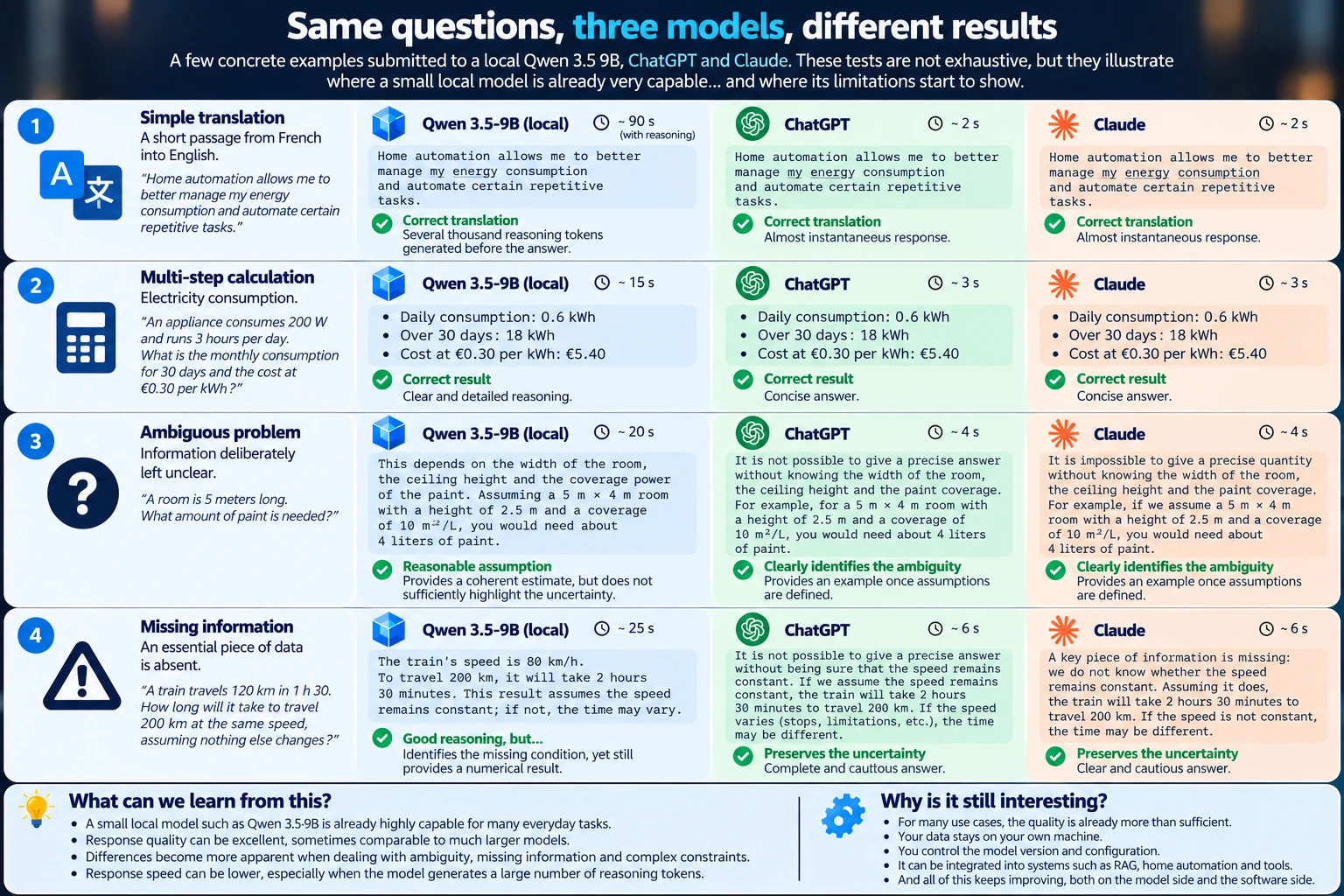
On well-defined problems, the small model performs remarkably well. When the constraints become more subtle, the gap starts to appear.
In one of my tests, Qwen correctly identified that a crucial piece of information was missing and explained why it was necessary... before nevertheless concluding with a numerical answer. ChatGPT and Claude, on the other hand, maintained the uncertainty all the way to the end.
Is that a failure?
Not really. The small model had understood the problem and its consequences. What it failed to do was maintain, all the way through, a constraint it had itself identified.
That's probably a better way to look at the limits of a small model. There is no sharp boundary between what it can and cannot do: its reliability gradually decreases as complexity, ambiguity and the number of constraints increase.
So the real question becomes less:
What is the best model?
and more:
Is this model good and reliable enough for the task I want to give it?
A deliberately unfair comparison
Let's be clear: this isn't a fair fight. My Qwen3.5-9B runs locally, quantized, on consumer hardware, while ChatGPT and Claude rely on infrastructure and models on an entirely different scale.
I'm therefore not trying to prove that a 9B model installed at home can beat the best online models. That would be rather presumptuous.
What interests me is finding the point at which the difference actually starts to matter for what I want to do with it. And that boundary is moving quickly.
Why run it at home?
If the model is less capable, why bother?
The first answer is probably independence. My model doesn't need the Internet, doesn't depend on a provider keeping an API or a specific model in its catalog, and doesn't depend on that provider deciding that my usage still fits within the terms of my subscription. The data I send to it stays on my network --- at least as long as the tools I connect to it are local too.
More importantly, I control what is running. This is something I hadn't really considered at first: reproducibility. My model file, in GGUF format, doesn't change overnight. I keep the same version, the same quantization, the same parameters and the same inference engine.
When a new version appears, I install it alongside the old one, rerun my tests, compare the results, and then decide whether to replace the previous version. An update becomes a decision rather than an event you simply have to accept, which is far from trivial when a model is integrated into other systems.
It isn't really a chatbot
This is probably the most important point: I wasn't trying to build a bargain-basement version of ChatGPT. A local model becomes much more interesting when you consider it a building block in a system.
At home, that's already the case with a fully local Home Assistant voice assistant. The voice satellite is homemade too: ESP32-S3, microphone, speaker, LED ring and a 3D-printed enclosure.
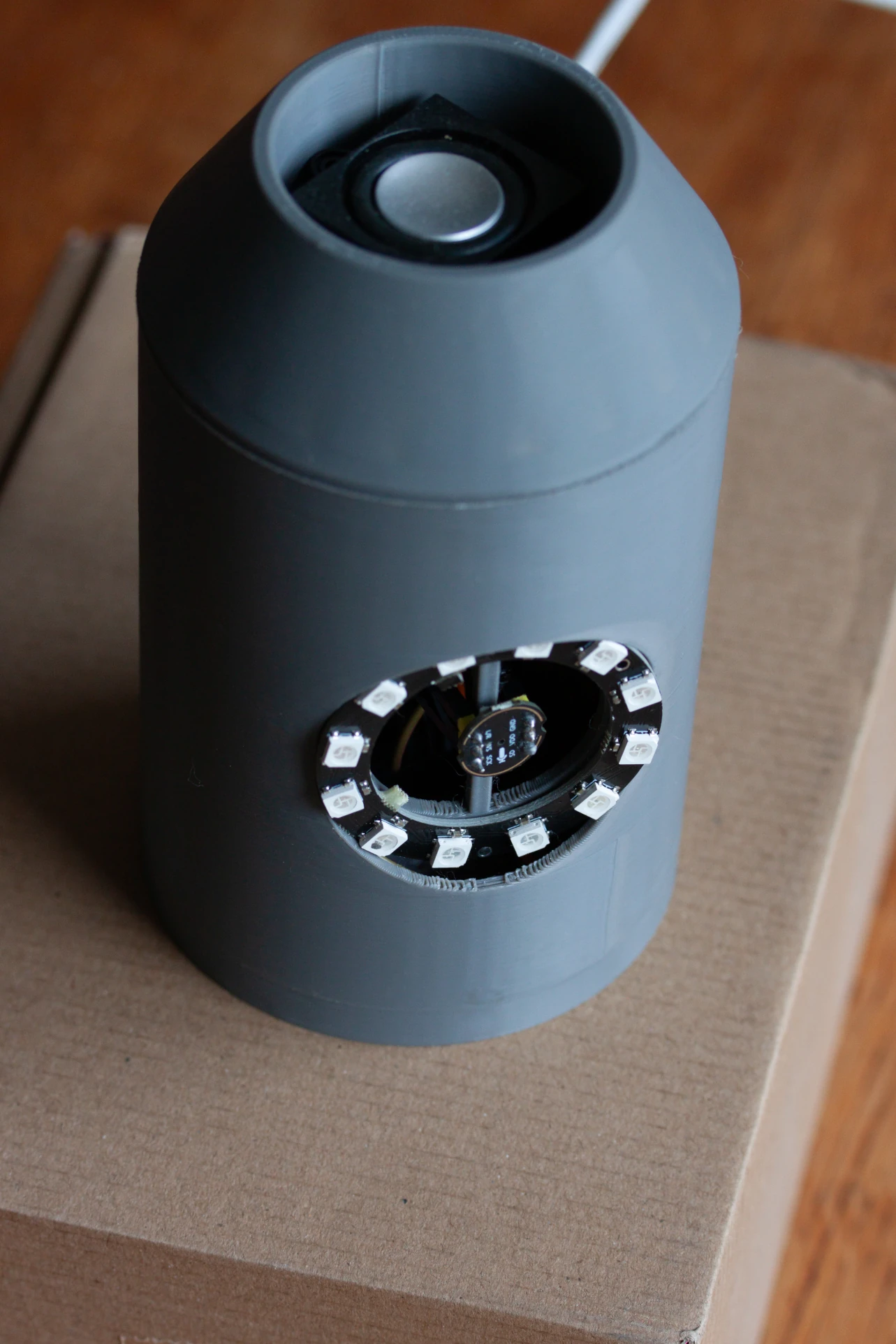
The rest of the chain is distributed across my infrastructure:
- the wake word is detected directly on the satellite;
- speech recognition is handled by Whisper, in a Docker container using an RTX 3070 Ti;
- the request is interpreted by Qwen3.5-9B, with reasoning disabled;
- Piper, installed on the Home Assistant VM, generates the spoken response.
None of these components needs the Internet.
In everyday use, the whole system felt responsive enough that I had trouble telling whether I was actually waiting after asking a question. So I measured it.
For two very simple questions, Home Assistant reports 0.13 to 0.14 seconds for Whisper, then 0.48 to 0.54 seconds for Qwen processing. Piper synthesis is fast enough to be displayed as 0 seconds by the interface. In other words, the STT + LLM + TTS stages measured by Home Assistant take around 0.6 to 0.7 seconds.
That isn't exactly the latency from my mouth to my ears: the measurement doesn't necessarily include end-of-speech detection, audio transport, buffering or the physical startup of the speaker. But it matches the subjective experience quite well: for a simple request, I'm practically not waiting for the model at all.
I also tested a real home-automation command:
Turn on the living-room ceiling light.
This time, Qwen has to understand the request, select a Home Assistant tool, generate the tool call, wait for its result, then formulate the response. Natural-language processing takes 2.1 seconds, plus 0.14 seconds for speech recognition. Still entirely local.
And since this assistant needed a personality, it will be GLaDOS, the delightfully sarcastic (and not exactly benevolent) artificial intelligence from Portal.
The idea isn't mine, by the way: I owe it to the YouTube channel GuiPoM -- G. testé !, whose video about GLaDOS and Home Assistant made me want to take the experiment in that direction.3 I didn't have to recreate her voice from scratch either: TazzerMAN provides a French GLaDOS model for Piper on GitHub, available for download.4
Qwen therefore plays the role of the brain, Piper gives it GLaDOS's voice, and Home Assistant gives it access to the house. All of this already works, and there is now enough material --- DIY satellite, local wake word, Whisper, Qwen, Piper, tool calls --- for a full article of its own.
But that's another story.
A local model is more than a parameter count
Saying that I run a "9B" describes only a small part of the setup. We also need to talk about quantization.
A model contains billions of numerical weights, and storing them at high
precision requires a lot of memory. Quantization reduces that precision,
and therefore the memory footprint. My Qwen uses Q4_K_M quantization,
which allows it to fit on an RTX 3070 Ti with 8 GB of VRAM (the graphics
card's own memory, where the model should ideally reside), while still
leaving room for Whisper.
But there is another major consumer of memory: context. When a model processes a conversation or a document, it needs to retain information about the tokens it has already processed so it can continue referring to them. That's the role of the KV cache, which grows with context length. This cache can also be quantized independently of the model weights.
So I've made two different compromises: Q4_K_M for the weights, Q8_0 for the KV cache. The idea is to reduce the footprint of the weights substantially while preserving more precision for the context.
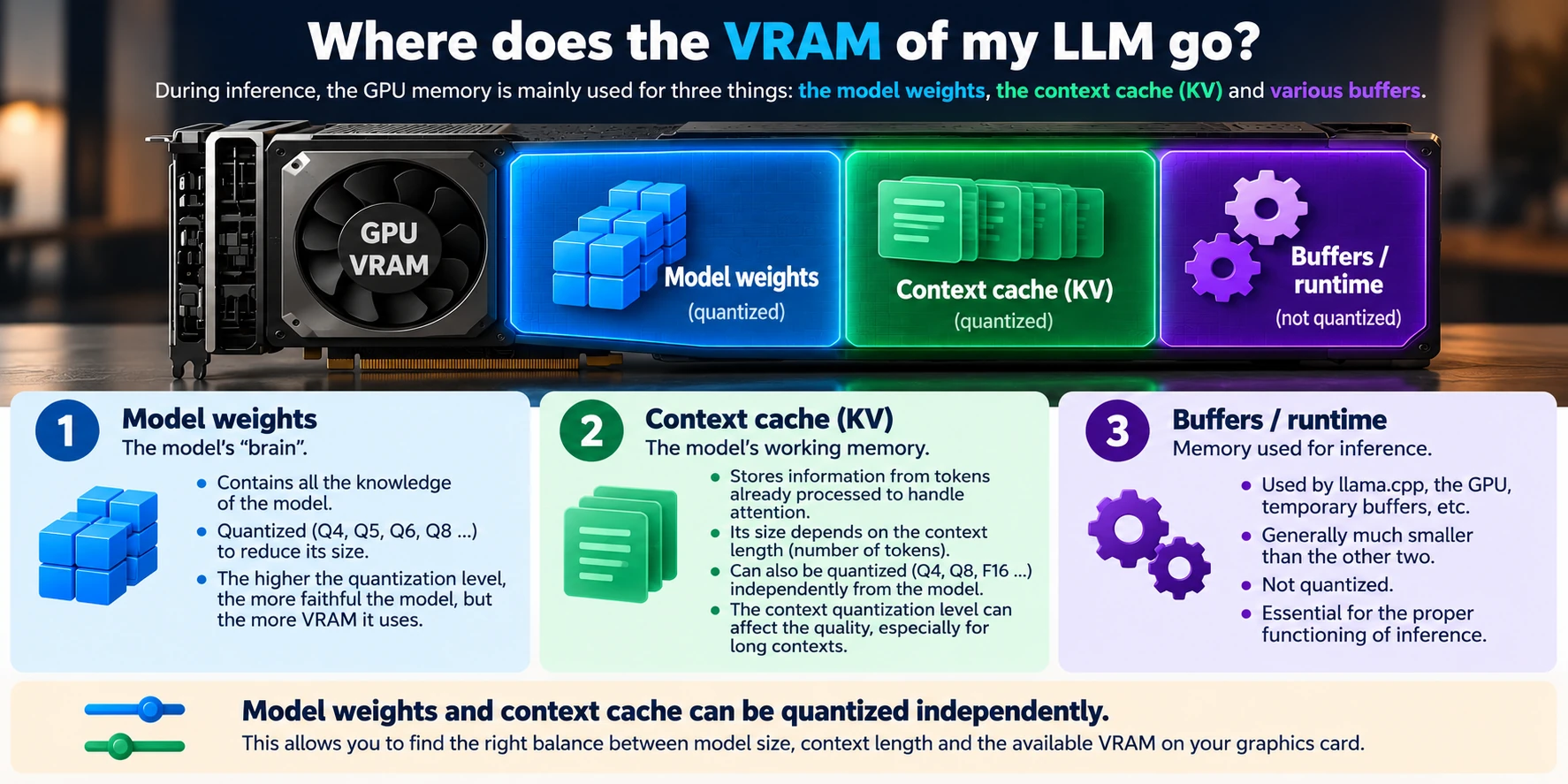
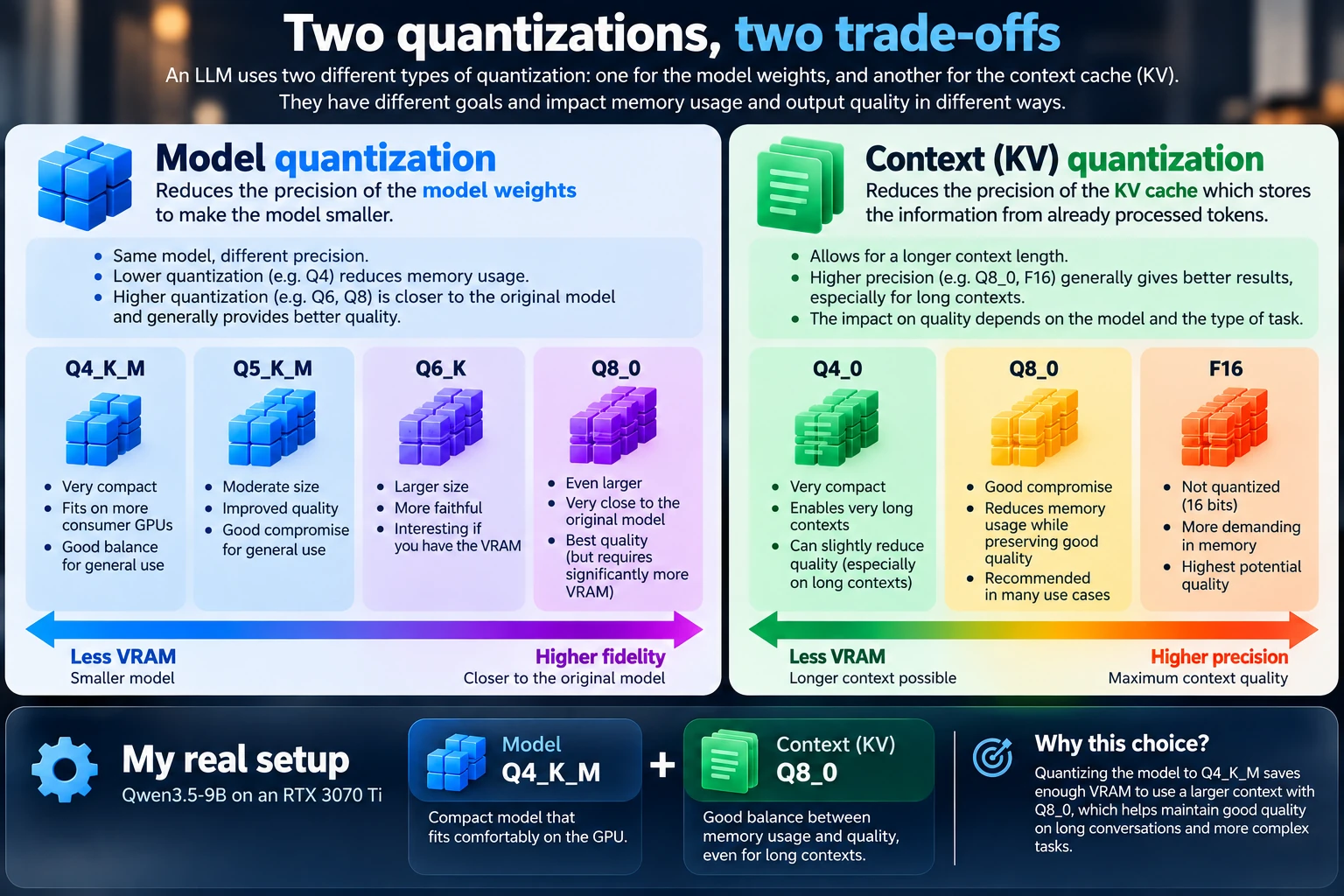
These infographics are deliberately simplified. The goal isn't to compare every format down to the megabyte, but to show the essential point: there are several places where you can choose to spend --- or save --- memory.
Running a local model properly therefore isn't simply a matter of downloading the largest file that fits in VRAM.
Context can matter as much as size
This context issue leads to something even more important: no matter how huge a model is, it doesn't know my own documents unless I provide them. A much smaller model, given the right information at the right time, can therefore become more useful than an infinitely more powerful model that doesn't have it.
That's exactly what RAG makes possible. A document collection is indexed; when a question arrives, a retrieval engine searches for the passages likely to answer it; those passages are added to the model's context, allowing it to understand them and formulate a response.
I built a small prototype of this around my local model. The aim wasn't to run an academic benchmark, but to answer a simple question:
Is a 9B model capable enough to make proper use of information retrieved from a document database?
For my use case, the concept is validated. The model doesn't need to memorize all my documentation; above all, it needs to understand the passages it's given, connect them to one another and answer correctly.
Again, retrieval quality, context size and the way that context is used matter almost as much as the number of parameters.
Don't ask the model to do everything
There is another way to push the limits of a small model: stop asking it to do things an LLM isn't well suited for.
Why make nine billion parameters laboriously perform a calculation that a calculator can solve instantly and exactly? Why ask it to memorize an entire documentation set if a search engine can provide the few relevant passages? Why ask it to know the state of my lights if Home Assistant can simply tell it?
An agent gives the model access to tools. The role of the LLM then changes: understand the request, choose the tool, provide the right parameters, then interpret the result. The nine billion parameters no longer define, by themselves, what the system can do.
A small model with the right support becomes much more useful than a small model on its own.
Linux and llama.cpp
I could have installed a nice application that downloads a model and lets you chat with it in a few clicks. That wasn't what I wanted: my model needed to become a service.
So it runs on Linux with llama.cpp.5 It's less flashy than a
desktop application, but I get exactly what I want: a lightweight,
controllable and automatable inference engine that I can expose on my
network.
Home Assistant can use it, my RAG can use it, and so can an agent. Tomorrow, something else can connect to it without the model needing to know who's asking.
llama.cpp also lets you choose precisely what stays on the GPU and
what can be kept elsewhere, for example by distributing model layers
between the graphics card and system memory.
Which leads us to another interesting phenomenon.
Not all parameters work at the same time
A dense model like my 9B uses all of its parameters for every token. That's not the only possible architecture.
Mixture of Experts (MoE) models contain a set of "experts" and a routing mechanism that selects only a few of them for each token. Qwen3-30B-A3B is a good example: it contains around 30 billion parameters but activates only about 3 billion per token. The much larger Qwen3-235B-A22B contains 235 billion parameters and activates around 22 billion.6
That doesn't mean a 30-billion-parameter model magically fits into the memory footprint of a 3B model: the inactive parameters still have to be stored somewhere. But they aren't all involved in computation, which opens up some interesting possibilities for local inference.
llama.cpp can, for example, keep all or some of the expert weights in
system RAM while leaving the rest of the model on the GPU. You trade
VRAM for more memory traffic and, generally, lower speed.
Some still-experimental work goes further: keep the experts in RAM, but
reserve part of the VRAM for a cache of frequently used experts. The
author of an RFC for llama.cpp reports, on an RTX 4090, an 84%
decoding improvement on a synthetic benchmark and 34% on a real
code-generation workload, using a pool of 64 experts.6
Those are the results of that particular prototype, not a general
benchmark for llama.cpp, and this is still experimental work rather
than a feature I would build a production setup around today.
But the direction is fascinating:
A model can become too large for my VRAM without necessarily becoming unusable on my machine.
System RAM, the CPU, the PCIe bus and caching strategies then become part of the equation.
The model improves. So does the software.
This may be the aspect I find most interesting. My RTX 3070 Ti has 8 GB of VRAM today, and it will still have 8 GB tomorrow. Yet what I can do with those 8 GB keeps evolving, because models are becoming more efficient and the software running them is improving too:
- quantization techniques are becoming more sophisticated;
- the KV cache can be compressed;
- MoE architectures further decouple a model's total size from the amount of computation required for each token;
- offloading makes it possible to distribute storage and computation between GPU and system memory;
- new techniques are trying to accelerate generation itself.
Very long contexts benefit from this optimization work too. The framework released with Qwen2.5-1M, which notably relies on so-called "sparse" attention (the model only looks at the useful parts of the text), reports a 3.2x to 6.7x speedup when processing a one-million-token document, depending on the model and hardware used.7
::: callout{type="know"}
Speculative decoding and MTP: producing several tokens at once?
An LLM traditionally generates its response one token at a time. Each new token requires additional computation.
Speculative decoding tries to accelerate this process by producing several candidate tokens in advance --- for example using a smaller and much faster model --- and then asking the main model to verify them. When the predictions are good, several tokens can be validated more efficiently.
MTP (Multi-Token Prediction) pursues a similar goal by allowing a compatible model to propose several future tokens instead of just one. Qwen3.5-9B itself is trained with a multi-step MTP mechanism.2
These techniques don't make the model smarter and don't give it more memory. Their main purpose is to make better use of the available compute to produce tokens faster.
Another interesting illustration: with identical hardware, local AI performance can improve simply because models and inference engines learn to make better use of that hardware. :::
And the movement continues.
TurboQuant, presented by Google Research in 2026, explores very aggressive quantization to greatly reduce the KV cache footprint while preserving quality. Google notably reports a 3-bit quantized KV cache with no measured loss on the benchmarks presented and, on a "needle in a haystack" test (finding one precise piece of information in a very long text), a reduction in cache size of at least sixfold.8
So it's entirely possible that tomorrow my RTX 3070 Ti will handle longer contexts, or even larger models, than I would consider realistic today with 8 GB.
My GPU doesn't change. What we manage to make it do does.
So, how much does it cost?
As promised, let's return to the question of investment. In my case, the answer is rather amusing:
€0.
I didn't buy any hardware for this experiment. The machine already existed, and so did the RTX 3070 Ti; it's essentially hardware that was recovered or no longer being used for its original purpose.
That obviously doesn't mean the hardware has no value. If I had to build a dedicated machine today using new components, the equation would be very different: a sensible configuration would quickly cost in the region of €1,000 to €1,500, depending on the GPU and the rest of the system.
That's precisely why I'm not sure I would recommend spending that amount solely to chat with a small local model. If, on the other hand, an older graphics card and a reasonably recent machine are sitting unused somewhere, the experiment becomes much easier to justify.
My own machine will probably evolve too: its little Ryzen is starting to become limiting, and I'm considering taking advantage of its AM4 platform to give it a more capable CPU. But that has almost nothing to do with inference, which mainly relies on the graphics card: the machine is simply accumulating enough other tasks to justify an upgrade of its own.
What about electricity?
Again, I preferred measuring rather than guessing.
This machine has to remain powered on permanently for other uses anyway, so only the additional cost caused by AI really matters. With Qwen and Whisper loaded into memory, my RTX 3070 Ti uses around 7.2 GB of its 8 GB of VRAM and draws 18 to 19 W at idle.
This measurement corresponds to my current llama.cpp configuration:
Qwen3.5-9B in Q4_K_M, a 32,768-token context and a Q8_0-quantized
KV cache. That detail matters: increasing context size or changing
cache quantization directly changes memory usage. The 7.2 GB figure is
therefore not an intrinsic property of the model, but the result of this
specific configuration.
llama.cpp/build/bin/llama-server \
  -m /srv/ssd/ia-models/Qwen3.5-9B-Q4_K_M.gguf \
  -ngl 99 \
  --flash-attn on \
  -c 32768 \
  --cache-type-k q8_0 \
  --cache-type-v q8_0 \
  --host 0.0.0.0 \
  --reasoning off \
  --port 8080
During sustained generation, it's obviously a different story: I measured 285 to 289 W, with around 91% GPU utilization. In other words, the card can get very close to its power limit while it's working. But it doesn't do that continuously.
A simple response from my assistant requires less than a second of Qwen processing. Even my small energy problem took only 14 seconds when reasoning was disabled.
That's another way of looking at my translation test. Even assuming the card draws its maximum power for the entire generation, 285 W for 93 seconds represents at most around 7 Wh, compared with around 0.06 Wh for 0.8 seconds.
These are upper bounds, not measurements: for accurate energy
consumption, I would need to log power throughout the entire generation
and integrate it over time, rather than relying on a few nvidia-smi
snapshots. But the order of magnitude is enough to demonstrate one
thing: energy cost depends just as much on how long the model is
working as on the card's maximum power draw.
What if I had more VRAM?
That's probably the hardware limitation I feel most strongly.
The most powerful card I own is an RTX 5080, but it's installed in my desktop PC: it isn't dedicated to this use and therefore can't run 24/7 for a service that needs to remain permanently available. And calling it "small" seems ridiculous anyway...
Until you stop looking primarily at its compute performance and start looking at its 16 GB of VRAM. With 24 or 32 GB, another category of models becomes much more accessible.
And the boundary keeps moving: between more efficient dense models, MoE, quantization, offloading and runtime improvements, what is possible on a given piece of hardware keeps expanding. The hardware will evolve too: 24 or 32 GB of VRAM is still expensive for a private user, but it probably won't remain a high-end luxury forever.
Ironically, this evolution is happening just as the enormous demand from datacenters is putting pressure on the memory and storage markets. But that would take us into SSDs, RAM, hard drives, hyperscalers and their energy requirements.
And that clearly deserves another story.
So what is my little model actually useful for?
It translates, summarizes and understands requests. It extracts and structures information, works with my own documents and powers a local RAG. It calls tools and can become a building block in a much larger system.
And it powers a voice assistant that keeps working when my Internet connection goes down.
When its own capabilities are no longer enough, a well-designed architecture prevents it from having to do everything itself.
I still don't think it can replace ChatGPT or Claude. But that wasn't the question.
The question was:
How far can you go with a local model of only 9 billion parameters?
And the answer is becoming interesting: much further than I would have imagined.
More importantly, today's answer probably isn't the one I will give a year from now. Small models are improving, as are training methods, quantization, inference engines, architectures and the tools surrounding them. The hardware will eventually become more accessible too.
That may be what I find most interesting about local AI:
I'm not only waiting for computers to become more powerful. I'm also waiting for models and software to become better at using the computers we already have.
Credits and sources
Additional credits
- GLaDOS and Portal are creations of Valve.
- The Home Assistant latency measurements, Reasoning ON/OFF tests and
nvidia-smimeasurements presented in this article come from my own setup and tests. - The benchmark results cited remain those published by their respective authors; they do not constitute a direct comparison with my local tests.
Footnotes
-
Qwen Team — Qwen3: Think Deeper, Act Faster, April 29, 2025. https://qwenlm.github.io/blog/qwen3/ ↩
-
Qwen — Qwen3.5-9B, official model card and benchmark results. https://huggingface.co/Qwen/Qwen3.5-9B ↩ ↩2
-
GuiPoM – G. testé ! — YouTube video about integrating GLaDOS into Home Assistant. https://youtu.be/qeDvR1QU5XM — This project gave me the idea of using GLaDOS as the personality of my voice assistant. ↩
-
TazzerMAN — Piper Voice GLaDOS FR, French GLaDOS TTS model for Piper. https://github.com/TazzerMAN/piper-voice-glados-fr ↩
-
ggml-org — llama.cpp, LLM inference engine in C/C++. https://github.com/ggml-org/llama.cpp ↩
-
memoriaru — RFC: Persistent expert slot pool for MoE CPU offload (
--moe-expert-cache), +84% decode, experimental llama.cpp discussion, September 2026. https://github.com/ggml-org/llama.cpp/discussions/28248 ↩ ↩2 -
Qwen Team — Qwen2.5-1M: Deploy Your Own Qwen with Context Length up to 1M Tokens, January 27, 2025. https://qwenlm.github.io/blog/qwen2.5-1m/ ↩
-
Google Research — TurboQuant: Redefining AI efficiency with extreme compression, March 24, 2026. https://research.google/blog/turboquant-redefining-ai-efficiency-with-extreme-compression/ ↩
Comments
No comments yet.
Add a comment