
Smartening Up Your Light Switches with SONOFF Modules
Adding a SONOFF module behind a light switch sounds simple… until you encounter your first two-way circuit. Between permanent live, switched live, travellers, neutral, S1, S2 and models that don't all behave the same way, it's worth understanding the circuit before you start moving wires around. This article goes through the main configurations step by step, with the diagrams and pitfalls I wish I'd had when I started.
Smartening Up Your Light Switches with SONOFF Modules
On paper, adding a SONOFF module behind a light switch seemed fairly simple.
A live feed, a lamp, a switch, a few terminals on the module. Insert the SONOFF into the circuit, connect the switch to its external input and the job is done.
Or so I thought.
I fairly quickly ran into a two-way switching circuit and, because I wanted to prepare the installation properly before taking anything apart, I started looking for wiring diagrams. There were plenty of them.
The problem was that they did not all tell exactly the same story.
S1, S2, permanent live, travellers, modules with or without neutral… some explanations seemed to contradict each other and, in an attempt to clarify things, I even asked AIs to prepare wiring diagrams matching my installation precisely.
As we will see, that was not necessarily a brilliant idea.
More importantly, while trying to understand why something so ordinary had suddenly become so confusing, I eventually discovered that the problem was not limited to two-way switching at all. Depending on the SONOFF model, the way the physical switch itself had to be connected could differ.
Even the case that seemed most obvious — one switch, one lamp, one module — turned out to deserve a closer look at what was actually happening behind the terminals.
So we might as well start from the beginning.
What Exactly Are We Talking About?
Before talking about connected modules, S1, S2 or Home Assistant, we first need to look at the circuit we are trying to modify.
In a traditional domestic installation, when the same light needs to be controlled from several locations using latching rocker switches, we essentially encounter three mechanisms.
The first is the simple switch: one control point for one light.
With two control points, we use two two-way switches. The live feed arrives at the first, two conductors — the travellers — connect the two mechanisms, and the second sends the switched live to the lamp.
With three control points, the two two-way switches remain at the ends, but an intermediate switch is inserted between them. It either crosses the two travellers or passes them straight through.
And if three switches are still not enough, the same principle continues by adding more intermediate switches between the two two-way switches.
For n control points with n > 2, we therefore get:
2 two-way switches + (n - 2) intermediate switches
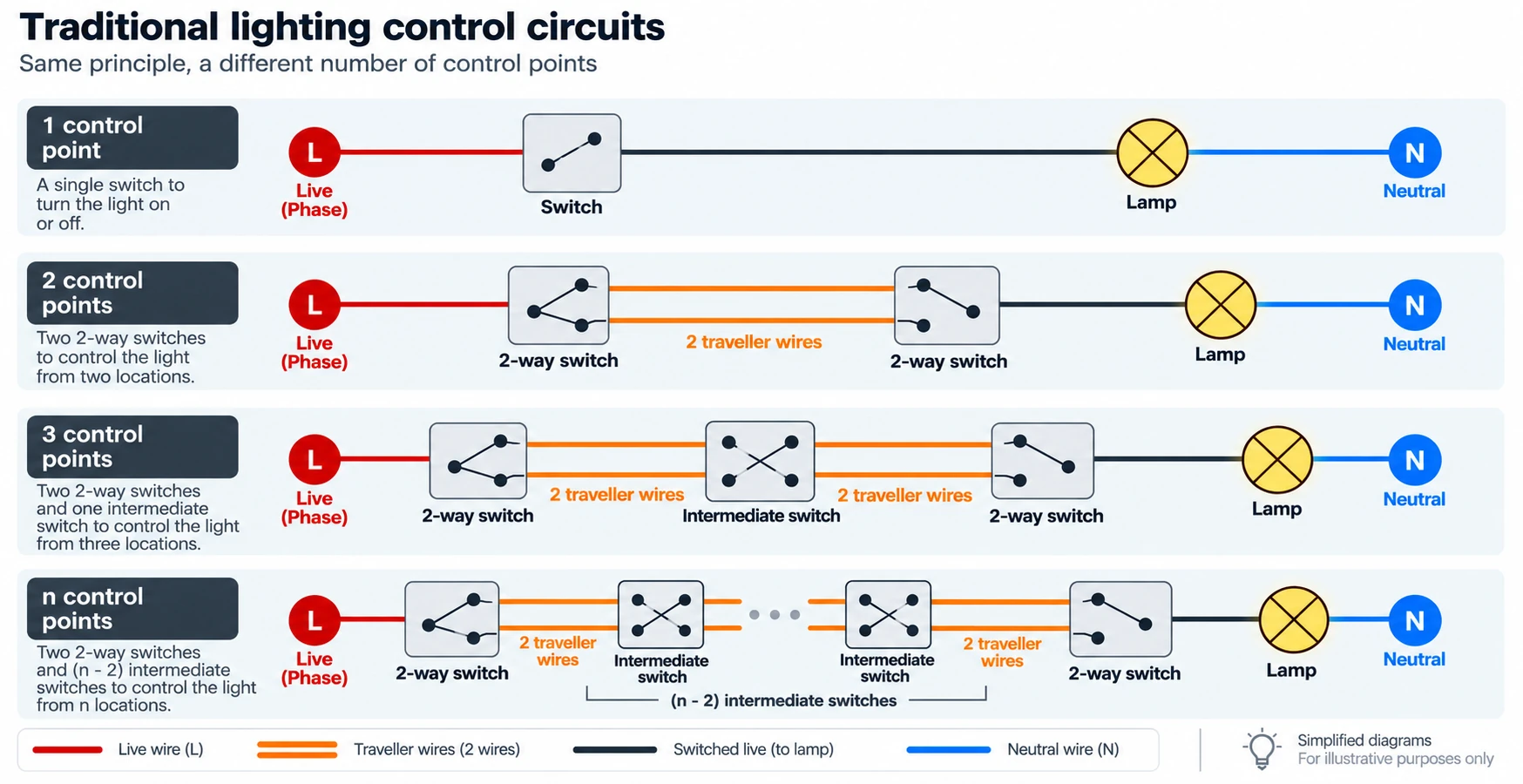
This is the family of circuits I will cover here.
There are, of course, other ways to control a light from several locations. Push-buttons connected to an impulse relay, for example, work according to a completely different principle.
They are not more or less suitable for home automation. They simply present a different problem.
And since this one has already kept me busy long enough, we will avoid inviting its cousins.
Before Making It Smart, Understand What Is Already There
At this point, it is tempting to choose a SONOFF module, look at its wiring diagram and start moving wires around.
That is more or less how I originally approached the problem.
With hindsight, I would now do exactly the opposite.
The module comes after the existing circuit.
The first thing to determine is therefore what is actually present in the wall box:
- which conductor brings in the permanent live;
- which one goes to the lamp;
- which conductors are the travellers;
- whether a neutral is available;
- and where these different conductors are located in the circuit.
With a simple switch, the situation is generally fairly easy to read: the permanent live and the conductor going to the lamp are found in the same place.
With a two-way circuit, things are already different.
The permanent live normally arrives at the first two-way switch, while the conductor going to the lamp is connected to the last one.
In other words, the two things our future module needs are inconveniently located at opposite ends.
But before reaching for the screwdriver, there is one rule that matters slightly more than all the others.
Now Let's See What Is Actually in the Wall Box
The power is off and the absence of voltage has been verified, so we can start looking at what is really in front of us.
And this is probably the right time to adopt a few tools that professionals generally have the good sense to use, but that the Sunday electrician may be tempted to leave aside:
paper, pencil and eraser.
Before changing anything, I now find it very useful to sketch the circuit as I currently understand it. There is no need for an electrical drawing worthy of an engineering office: a few lines, the position of the switches, the conductors arriving in the box and the functions we think they have are more than enough.
Mark what is certain, what has been measured and what is still only a hypothesis.
And the eraser is not there for decoration.
During an exploratory phase, what seemed perfectly clear five minutes earlier quite often deserves a small correction.
A smartphone is the other particularly useful tool. Before disconnecting the first conductor, I take a photo of the existing wiring. A few intermediate photos cost nothing either if the dismantling becomes more complicated.
A conductor that looked perfectly obvious while it was still connected can become considerably less talkative once it is sitting among five other wires at the back of the wall box.
At this stage, the goal is not yet to draw what the installation should be.
We are simply building a map of what we are discovering.
Colours Give Clues, Not Certainty
Obviously, conductor colours help enormously.
When you find a blue wire, the first reaction is fairly naturally:
Great, a neutral.
That is certainly what I thought when I found one behind one of my switches.
And having a neutral available was rather good news, because it opened the door to more module choices.
Except that the multimeter clearly disagreed.
The readings were strange, variable and did not really match what I expected from a neutral.
So I investigated a little further.
By following the cable and opening another wall box, I eventually found its other end.
It was connected to absolutely nothing.
My wonderful blue wire was therefore not a neutral. It was simply a floating blue conductor.
The strange readings on the multimeter suddenly became much less mysterious: because of its high input impedance, a digital multimeter can quite happily display an induced or capacitive voltage on a conductor that is connected to nothing.
That does not mean that an odd voltage proves a conductor is floating. It mainly means that you need to keep investigating.
In my case, checking the other end provided the answer.
And I have absolutely nothing against the electrician who installed the wiring. On the contrary, the installation is clean and logical, which has made my life easier on many occasions. He had probably planned something, then the project changed and that cable was simply never used.
A situation I would be particularly poorly placed to criticise.
The wire is still there.
I might need it one day.
The rule I took away from this is therefore fairly simple:
Colour lets you form a hypothesis. Measurement lets you verify it. An inconsistent measurement deserves investigation, not an improvised conclusion.
Or, put another way:
A wire of the right colour is not yet a neutral. It is just a wire of the right colour.
What We Are Actually Looking For
Once the initial survey is complete, we need to identify a few specific things:
- the switched live to the lamp, meaning the conductor that runs from the final switching mechanism to the lamp;
- the permanent live, which will power the module;
- the neutral, if it is present and if the chosen module requires it;
- the travellers in the case of a two-way circuit or a circuit containing intermediate switches.
This matters because our module is going to redistribute the roles.
In the traditional circuit, the switch — or the final two-way switch — directly sends live to the lamp.
After the modification, that will no longer be the case.
The SONOFF will power the lamp.
The conductor that previously ran from the final switch to the lamp will therefore be connected to the module's L Out.
That directly determines where the SONOFF must be installed:
the module has to be located at the switched-live-to-lamp end.
With a simple switch, this causes little difficulty: the permanent live and switched live to the lamp are normally available in the same wall box.
With a two-way circuit, however, the switched live to the lamp is at the final mechanism while the permanent live arrives at the first.
Our module is therefore in the right place to power the lamp, but it is still missing something rather essential:
a permanent live.
Fortunately, we already have a few wires running between the two ends: the travellers.
And we can repurpose one of them.
Bringing a Permanent Live to the Module
With a simple switch, the permanent live already arrives in the wall box and can be tapped to supply L In on the module.
With a two-way circuit, it is less immediate.
Our SONOFF has to sit at the switched-live-to-lamp end, at the final two-way switch. But the permanent live arrives at the other end of the circuit.
We could, of course, consider pulling in an additional conductor.
Fortunately, that is normally unnecessary.
The two two-way switches are already connected by two travellers. Since the switches will no longer directly power the lamp, we can slightly change their roles.
One of the two travellers will continue to take part in the control circuit.
The other will simply carry permanent live to the SONOFF.
It does not matter which one you choose. You simply need to remain consistent at both ends.
At the Permanent-Live End
On the first two-way switch, the permanent live arrives at the common L terminal.
It stays there.
One of the two travellers, however, is removed from its terminal and connected directly to that same permanent live.
We therefore get two branches from the live feed:
- one to the
Lterminal of the first two-way switch; - one to the former traveller we have just repurposed.
This connection can be made with a Wago connector or, where the mechanism and circumstances allow it, by looping directly from the switch terminal.
On paper, you may have a preference.
Inside the wall box, sometimes it gets the final say.
Our former traveller no longer switches anything. It now carries permanent live continuously to the other end of the circuit.
At the Lamp End
We find that former traveller in the wall box where the SONOFF is installed.
It is connected to:
L In
The module now has:
- permanent live on
L In; - the lamp on
L Out; - and, if the model requires it, neutral.
The path that actually powers the lamp is now very simple:
permanent live → L In → SONOFF → L Out → lamp → neutral
The switches are no longer part of this path.
And that is probably the single most important thing to understand in the whole arrangement.
Separating Power and Control
In the original circuit, the switches formed part of the path taken by live to the lamp.
They directly determined whether the lamp received power.
With the SONOFF, that role changes.
It is now the module's relay that decides whether L In is passed to L Out.
The switches become nothing more than a control input to the module.
We can therefore distinguish the two functions very clearly:
Power:
L → L In → SONOFF relay → L Out → lamp → N
Control:
switches → SONOFF control input
And this is exactly where the S1 and S2 terminals enter the story.
What Happens to the Other Traveller?
We have only repurposed one of them.
The second remains connected between the two two-way switches.
On the first mechanism, we therefore have:
- permanent live on
L; - one traveller terminal now unused;
- the other traveller still connected.
On the second:
- that same traveller still arrives at its terminal;
- the other traveller terminal is now unused;
- and the common
Lterminal, which previously powered the lamp, is now free.
When either switch is operated, the circuit formed by the two two-way switches therefore continues to change state.
It simply no longer powers the lamp.
The common L output of the final two-way switch can now be used to tell the SONOFF that this state has changed.
And this is where I originally thought things were finally going to become simple.
All I had to do was connect that output to the module's control input.
S1 or S2.
Two terminals.
Surely it could not be that complicated.
Well, yes.
S1, S2… and the Beginning of the Trouble
This is probably where the documentation confused me the most.
While looking for the correct switch connection, I found diagrams using S1, others using S2, explanations mentioning normally open contacts and still other arrangements that seemed to tell a different story again.
The problem was not necessarily that all this information was wrong.
The problem was that it did not always refer to the same SONOFF module.
And that is an easy distinction to lose when several devices present terminals with exactly the same labels.
I had naturally assumed that S1 and S2 represented a reasonably consistent control interface across the range.
That would have been too easy.
I kept searching, mainly trying to find a diagram that simply said: with this module and this type of switch, connect this here.
And I eventually came across, more or less by accident, an Australian website showing several SONOFF modules and their different wiring cases with much clearer diagrams.
No long explanation. No complicated theory.
Just the few drawings I had been missing from the start.
Moving from one module to another, I finally saw what explained a good part of my confusion: the terminal used for the control input was simply not the same on every model.
For the models I eventually used or examined for this article, this is what it comes down to:
| Module | Control terminal used |
|---|---|
| ZBMINIR2 | S2 |
| ZBMINI-L2 | S2 |
| MINI-ZBDIM | S1 |
| MINIR4M | S2 |
That small table ultimately summarises the information I wish I had found clearly presented from the beginning.
For the latching-switch arrangements described here, the wiring principle does not change.
The wiring principle does not change. The control terminal does.
Now for the Actual Cases
Now that we know what we are looking for, the different arrangements become much easier to read.
The principle is always the same:
- the SONOFF is installed at the switched-live-to-lamp end;
- that switched live is connected to
L Out; - the module receives a permanent live on
L In; - the switches no longer power the lamp directly;
- their control signal reaches
S1orS2, depending on the model.
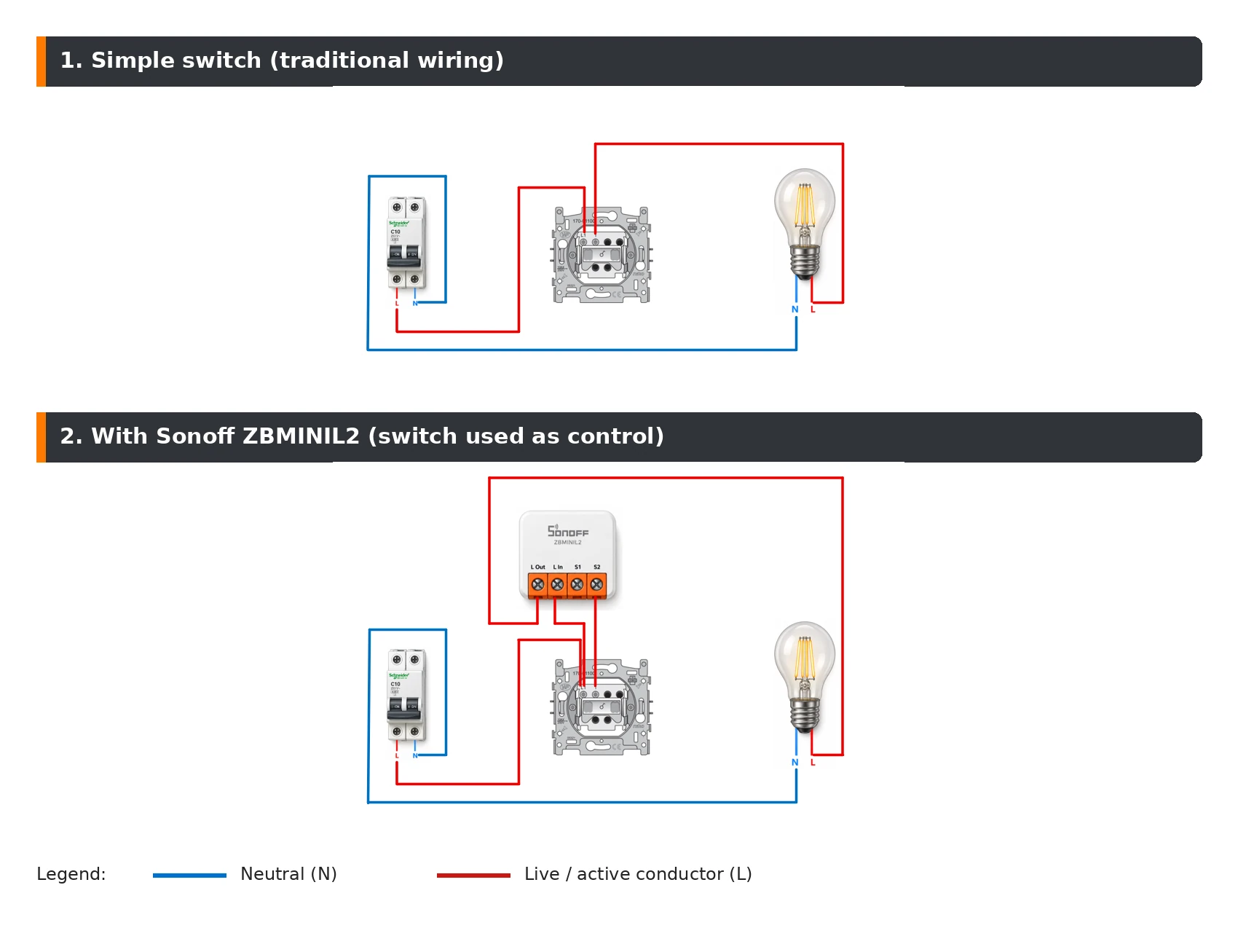
One Simple Switch
With a simple switch, we generally have everything we need in the same wall box.
Permanent live arrives at the switch and switched live to the lamp leaves it.
The switched-live conductor is removed from the switch and connected to L Out.
Permanent live is tapped to supply L In.
The switch is then connected to the appropriate control input on the module.
If the model requires neutral, it must of course be available and connected to the module.
We therefore get two clearly separate paths:
Power:
L → L In → SONOFF → L Out → lamp → N
Control:
L → switch → S1/S2
And something I had missed at the beginning already appears here: even with one simple switch, you need to understand the behaviour of the specific model to know where that control should be connected.
The two-way circuit was not really the source of the problem.
It simply had the good sense to make me discover it.
Two Switches: Two-Way Switching
With two control points, we return to the case that originally sent me searching for answers all over the place.
Before modification, permanent live arrives at the common terminal of the first two-way switch, two travellers connect the mechanisms and the common terminal of the second goes to the lamp.
To add the module, we simply apply what we have already seen.
The SONOFF is installed at the switched-live-to-lamp end.
One of the two travellers is repurposed to carry permanent live to L In.
The other remains between the two switches.
The common terminal of the second two-way switch becomes our control output and connects to S2 in the case of the ZBMINI-L2 shown in the diagram.
Finally, the former switched live to the lamp is connected to L Out.
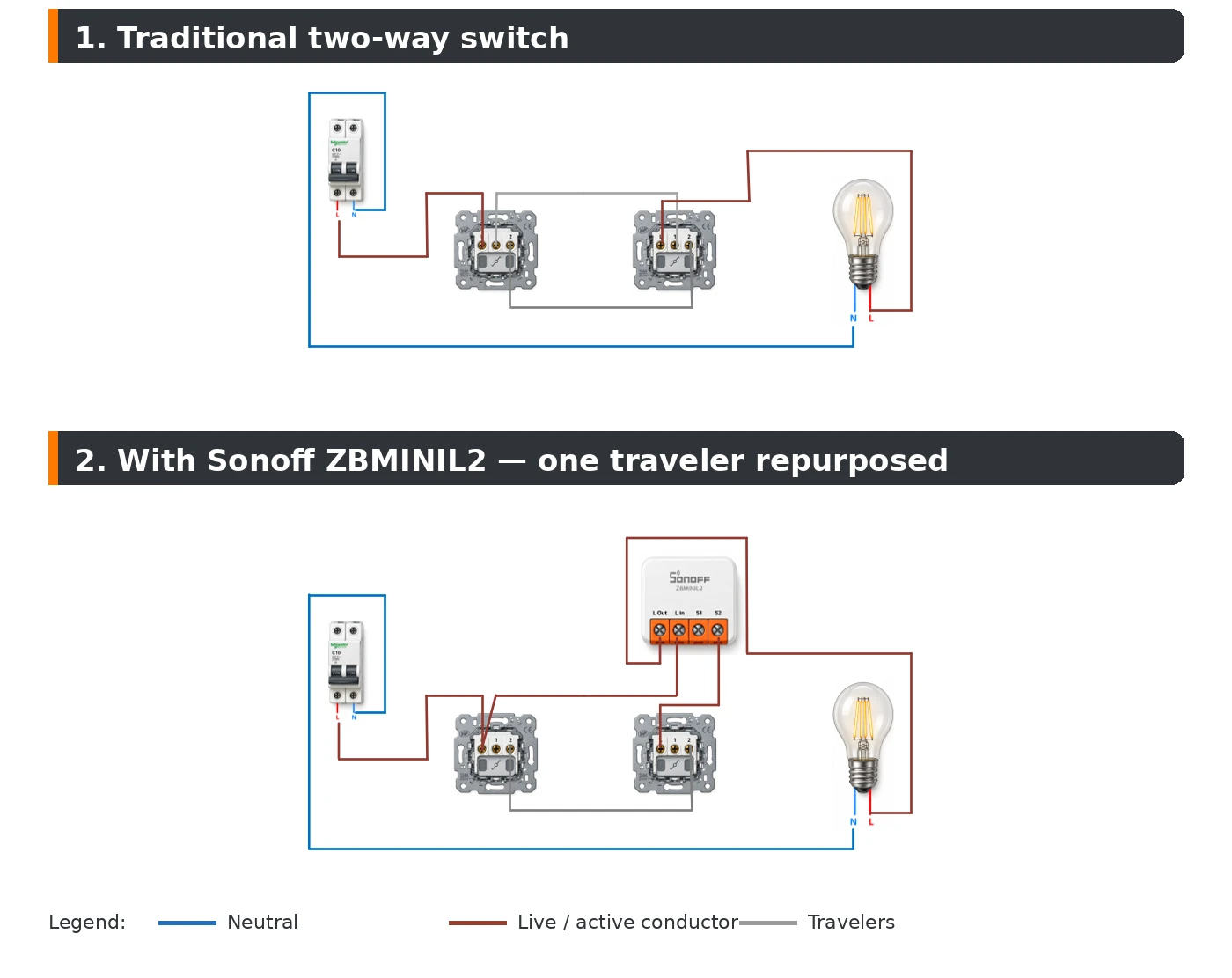
Electrically, the switches are no longer part of the lamp's power circuit.
Yet from the point of view of someone entering the room, nothing has really changed.
They operate either switch and the lamp changes state.
The only difference is that this change now passes through the SONOFF.
Home Assistant can turn the lamp on or off independently of the physical positions of the switches. When one of them is operated afterwards, the module detects the change on its input and changes the state of the lamp again.
The physical positions therefore no longer necessarily mean “on” or “off”.
Then again, with two-way switching, they never really did.
The switches say that the state should change; the SONOFF keeps track of the lamp's actual state.
Three Switches: Add an Intermediate Switch
With three control points, we simply add an intermediate switch between the two two-way switches.
In the traditional circuit, it either crosses the two travellers or passes them straight through.
When the SONOFF is added, the principle remains the same.
One of the former travellers is used to carry permanent live to the module.
The rest of the circuit continues to produce the state changes used as the control signal.
The intermediate switch therefore remains part of the control circuit.
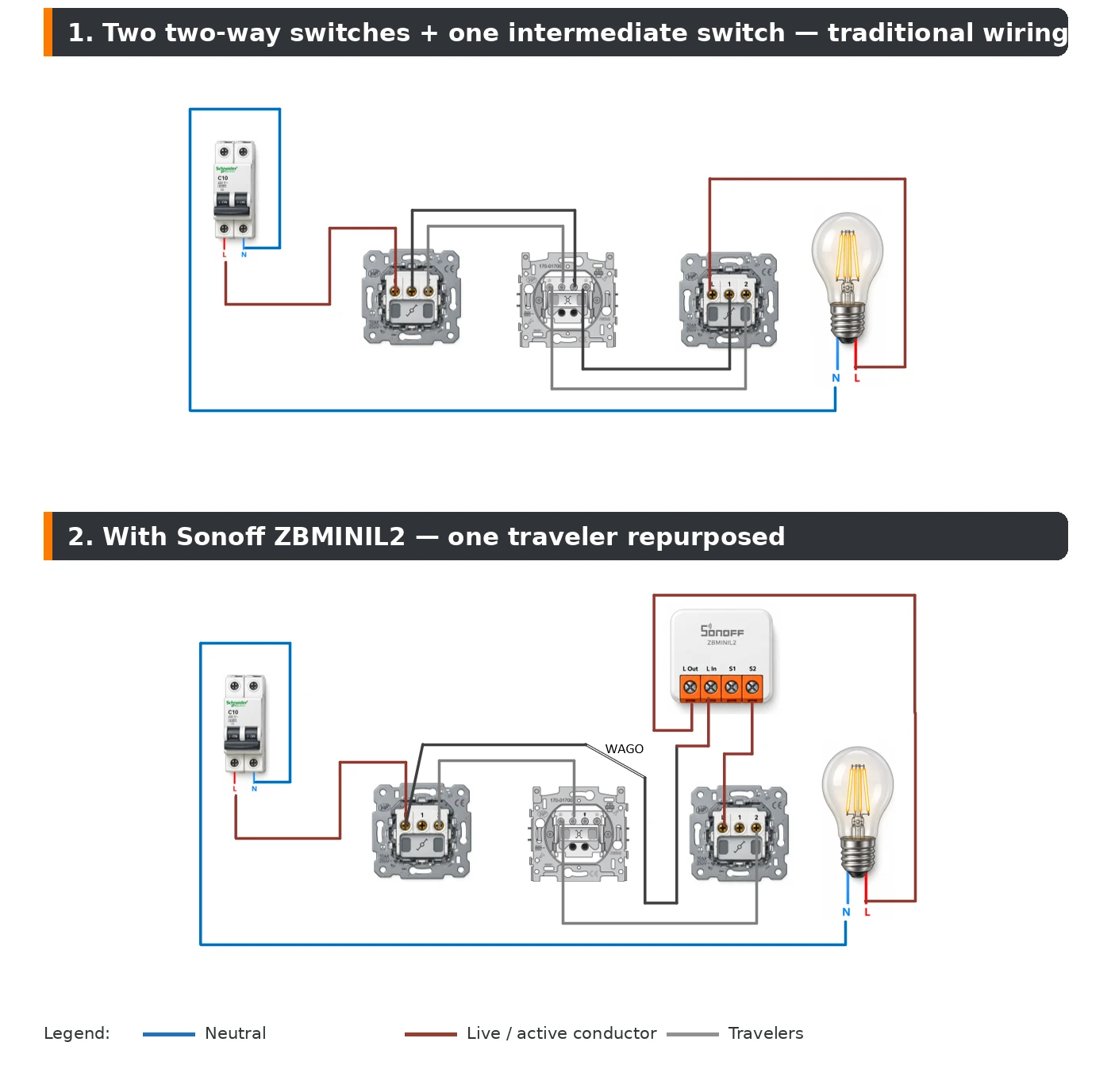
This is also what allows the principle to extend to more control points.
Four switches?
Two two-way switches and two intermediate switches.
Five?
Two two-way switches and three intermediate switches.
And so on.
We return to our original formula:
2 two-way switches + (n - 2) intermediate switches
The number of control points increases, but the principle for integrating the module no longer changes.
Which Module Should You Choose?
Now that we know how to integrate the module into the circuit, one fairly obvious question remains: which one should we use?
And the answer is not necessarily:
the one I prefer.
In some cases, the installation will largely make the choice for us.
The first two things to check are very down-to-earth:
- is neutral available?
- will the module physically fit in the wall box?
Only then do the functions we would like come into play.
With or Without Neutral
If neutral is available, there are generally more options.
A module such as the ZBMINIR2 can be powered directly between live and neutral.
If no neutral is available, a module such as the ZBMINI-L2 becomes particularly interesting because it is specifically designed to operate without one.
In many cases, that will simply be the most pragmatic choice.
But sometimes the function you want imposes something else.
Take a light that you absolutely want to dim. The MINI-ZBDIM, for example, requires a neutral.
If there is no neutral in the wall box, two possibilities appear:
give up that function or bring in a neutral.
Technically, pulling an additional neutral conductor may of course be possible.
In practice, however, you quickly move beyond the small job of adding a module behind a switch. You need to understand the conduit routes, check whether another conductor can be pulled through, perhaps intervene in other boxes or connection points...
In short, it can be done.
But it is no longer necessarily the same Sunday-afternoon project.
And It Still Has to Fit
The second criterion is much less electrical, but every bit as real:
space.
An electrical diagram has the wonderful property that wires take up no space.
A wall box does.
You need to fit the module, the switch mechanism, the existing conductors, the new connections and possibly a few Wago connectors.
And SONOFF modules are not all the same size.
A ZBMINI-L2 is noticeably more compact than a ZBMINIR2 or MINI-ZBDIM. A few millimetres may seem insignificant when the modules are sitting on a table.
Behind a switch already surrounded by conductors, they can make all the difference.
It is therefore worth checking before buying, especially if the wall box already looks crowded.
And you need to consider the total volume. A smaller module accompanied by three Wago connectors and six short lengths of wire is not necessarily easier to fit than another solution requiring fewer connections.
Once again:
sometimes the wall box gets the final say.
No Room? It May Not Be Over Yet
There is also the case where, even after looking at the problem from every possible angle and negotiating firmly with the conductors, the conclusion remains the same:
it does not fit.
That does not necessarily mean giving up on making that light smart.
Instead of adding a module behind the existing mechanism, you can replace it with a connected switch that integrates the electronics directly.
That removes the stack:
traditional switch + module behind it
and replaces it with a single device.
This type of solution can be much easier to fit in a shallow or particularly crowded wall box.
Of course, you are then replacing the existing mechanism. Appearance, dimensions, compatibility with the existing frames and plates, or simply the feel of the switch itself become criteria too.
There is therefore no universally better solution.
There is mainly the one that fits, provides the functions you want and remains consistent with the existing installation.
A Few Representative Models
I am not going to turn this section into a SONOFF catalogue. The range changes over time and, more importantly, the purpose of this article is to understand how to choose rather than to declare a winner.
The modules I have used or examined do, however, cover the situations encountered quite well:
| Module | Neutral | Particularity |
|---|---|---|
| ZBMINI-L2 | No | Very compact; useful where no neutral is available |
| ZBMINIR2 | Yes | Zigbee module with neutral |
| MINI-ZBDIM | Yes | Lighting dimmer |
| MINIR4M | Yes | Matter rather than Zigbee |
At first, I tended to choose the module and then work out how to install it.
I would now do the opposite: first look at what the installation allows, then choose the module that suits it.
Preparing the Installation
At this stage, we should normally know what is in the wall box, where the module needs to go and which model to use.
Before disconnecting anything, I draw the existing circuit and, beside it, the circuit I want to end up with. This makes it possible to determine in advance which conductors will change roles and which connections need to be added.
Taking another photo before starting is not excessive either.
The goal is simple: once the first wire has been disconnected, never have to wonder where it was connected before.
Tools and Materials
You do not ultimately need very much, but it is better to have everything at hand before starting:
- suitable insulated screwdrivers;
- wire strippers and possibly a utility knife;
- a suitable voltage tester for correctly checking the presence or absence of voltage;
- a multimeter if additional measurements are required;
- a few short lengths of conductor matching the existing circuit — generally
1.5 mm²for lighting; - a few Wago lever connectors, particularly 2-, 3- and perhaps 5-way versions;
- something to temporarily label a conductor if necessary;
- paper, pencil and eraser;
- a smartphone for photos and notes;
- a small headlamp — particularly useful when you are working on precisely the circuit that used to provide the light in the room.
Wago Connectors, but Not Necessarily Everywhere
Wago connectors have become practically indispensable to me for this kind of modification.
They make it easy to create a clean tap, add a conductor or join several wires without returning to old screw-terminal connector blocks that can loosen or be poorly tightened.
So I keep a few in reserve.
Well… “a few” is a fairly subjective concept.

A reasonably sized stock of Wago connectors. Any opinion to the contrary clearly results from an incorrect assessment of requirements.
That does not mean a Wago connector absolutely has to be used at every connection.
If a terminal on the switch mechanism is designed to accept the conductors concerned and the connection remains clean, looping directly at the terminal can be perfectly acceptable. Conversely, when the terminal is already occupied or more conductors need to be joined, a Wago often becomes the obvious solution.
And then there is our recurring problem:
space.
Adding a Wago also means adding its own volume and that of the conductors connected to it.
On paper, you may have a preference.
Inside the wall box, sometimes it gets the final say.
Wire and Test in Stages
For a first installation, I find it preferable to work in stages rather than modify the entire circuit and only restore power once everything is finished.
Start with the easiest part to isolate: the module and the lamp.
The switched live to the lamp is connected to L Out.
Permanent live is brought to L In.
If the module requires neutral, that is connected too.
At this stage, the power side is complete:
permanent live → L In → SONOFF → L Out → lamp → neutral
After checking the wiring and making sure all conductors are safe, power can be restored temporarily.
The module should start, and it should already be possible to verify that it controls the lamp correctly.
We Might as Well Pair It Now
The Zigbee SONOFF modules used here normally enter pairing mode automatically when first powered.
For the ZBMINIR2, ZBMINI-L2 and MINI-ZBDIM, this window lasts around three minutes.
You therefore only need to allow new devices to join the Zigbee network and let the module connect.
If those three minutes happened to pass while you were trying to work out why something was not responding as expected — an entirely theoretical possibility, obviously — holding the button for about five seconds restarts pairing mode.
Once the module appears in Home Assistant, you can already test control of the lamp.
If it switches on and off correctly, we have validated the entire power path independently of the physical switches.
Then switch the power off again before continuing the wiring.
This is also why I would not immediately reinstall the switch mechanism.
The little button used to restart pairing mode is considerably less convenient when it is sitting a few centimetres behind a freshly refitted switch.
The MINIR4M Case
The MINIR4M is slightly different from the others in our selection.
The electrical principle remains the same and its control uses S2, but its home automation integration is via Matter, not Zigbee.
Its initial pairing window is also longer — around ten minutes — and holding the button for five seconds restarts pairing mode.
I will not go any further into the Matter procedure here.
That would be an excellent way of turning three lines into another article.
Now Connect the Switches
The power side works.
We can therefore finish the control circuit.
With our ZBMINI-L2, the output from the final switch is connected to S2.
With a model that uses S1, we obviously use that terminal instead.
One Last Check: Edge Mode
Before testing the switches, there is one setting worth checking: the module's external trigger mode.
For the latching switches used in the arrangements described here, the mode we are interested in is Edge. The module then reacts to every change of state on its control input, regardless of the physical position of the switch.
That is exactly the behaviour we want: the switch indicates that the state should change, while the SONOFF keeps track of the lamp's actual state.
In Home Assistant, this setting is available in the module's exposed options:
Exposes → External trigger mode → Edge
The name or location of the setting may vary depending on the home automation solution used: this setting concerns the behaviour of the SONOFF module, not Home Assistant itself.
With the MINI-ZBDIM and ZBMINIR2, check that External trigger mode is indeed set to Edge. I no longer remember whether this mode was already selected by default when I installed mine, but it is exactly the kind of detail worth checking before starting to look for a wiring error.
The ZBMINI-L2, on the other hand, does not require this setting for the arrangement described here.
While you are in the module configuration, take a look at the other exposed settings as well. There is no need to change everything — far from it — but knowing what can be configured can sometimes save unnecessary searching later.
Test Every Control Point
Restore power temporarily and, this time, test every physical control point.
Not just the one in front of you.
In a circuit containing two two-way switches and one intermediate switch, for example, all three must correctly trigger a change in the lamp state.
Also test control from Home Assistant, then operate the physical switches again after changing the lamp state from Home Assistant.
That final test verifies the behaviour we actually want:
Home Assistant can change the state of the lamp, while the physical switches continue to work normally the next time they are operated.
Once all this has been validated, switch the power off again before reinstalling everything.
Everything Works. Now It Still Has to Fit.
There is one last very practical step:
putting all of this back into the wall box.
The objective is obviously not to push the module to the back and compress the conductors until the switch finally agrees to fit.
It is better to spend a few minutes arranging the wires, positioning the Wago connectors and finding the most natural place for the module.
The conductors can be folded progressively rather than crushed into a ball behind the mechanism. You should also avoid putting a connection under tension or strongly pinching a conductor when the switch is put back in place.
This is also a good moment to check one last time that every conductor is properly seated in its terminal and that all Wago levers are fully closed.
And if, despite all that, the mechanism stubbornly refuses to go back into place, there is no point reaching for a bigger screwdriver to persuade it.
The problem may no longer be organisation. There may simply not be enough space.
Once the mechanism is reinstalled, restore power and perform one final complete test: local control from every switch and control from Home Assistant.
This time, normally, the toolbox can be closed.
Well… almost.
One Last Slightly Special Case: The Double-Pole Switch
Everything we have looked at so far concerned switches that interrupt or switch a single conductor, in practice the live conductor.
In Belgium, you can also encounter double-pole switches.
A double-pole switch disconnects both live and neutral at the same time.
Their use is associated with the requirements applying to certain situations in rooms containing a bath or shower, with the position of equipment relative to water points, but also with some circuits supplying outdoor lighting points.
It is therefore perfectly possible to encounter this type of switch in a modern domestic installation; its presence is not simply a consequence of the installation's age.
And when I started looking at how to integrate a SONOFF in this situation, I ran into a fairly simple problem: among the modules discussed here, I did not find one that directly preserves this double-pole switching.
Technically, It Can Be Made Single-Pole
Since both live and neutral arrive at the mechanism, it is technically quite simple to change the circuit.
Neutral no longer passes through the switch: the two neutral conductors that were connected to it are joined directly — typically with a Wago connector.
The switch then controls only live, and the circuit can be treated according to the same principles described earlier.
There is even, for once, some immediate good news:
if you have a double-pole switch, you at least know that neutral is present in the wall box.
After our blue wire that was not a neutral, that is almost worth mentioning.
But This Is Not an Innocent Modification
Electrically, the arrangement will work.
But we have also changed a characteristic of the installation:
the switch no longer disconnects live and neutral simultaneously.
And that double-pole disconnection was not necessarily there by accident.
Converting a double-pole circuit to single-pole operation should therefore not be treated as a simple wiring trick.
In my case, this is therefore something I will deal with individually rather than applying the conversion automatically.
Because after spending this entire article explaining that you should understand an installation before modifying it, it would be rather unfortunate to change methods in the final three paragraphs.
And Now for the Bloopers
At this point, all of this almost seems logical.
Identify the circuit, find the switched live to the lamp, bring permanent live to the module, connect the control to the correct terminal and it works.
That would, however, be a rather inaccurate way of telling how I actually got here.
During my first attempt, the exact wiring of the S1 and S2 inputs remained unclear enough that I went looking for a little help.
And since we live in marvellous times, I asked an AI to prepare the diagram corresponding to my installation.
The diagram was clean.
The explanation was convincing.
I wired it.
The module worked perfectly from Home Assistant.
The physical switches, considerably less so.
My first fairly natural reaction was:
I must have made a mistake somewhere.
So I checked my wiring, then checked it again.
It matched the diagram.
The problem could therefore be the diagram.
Ask Another AI
Rather than continuing to argue with the first one, I decided to ask for a second opinion.
Another AI, the same problem, the same information and no indication of the solution previously suggested.
The idea was fairly sound: obtain an independent answer and see whether the two converged.
They did not.
The second AI suggested a different wiring arrangement.
It too looked perfectly plausible.
I wired it carefully.
It was worse.
No short circuit, nothing spectacular, but the module clearly did not behave as expected.
At that point I therefore had:
two AIs, two different diagrams and still no two-way switching that worked properly.
I restored the original circuit.
And took out the paper and pencil again.
Back to the Facts
It was by restarting from the circuit itself that things began to become clear.
What does the two-way circuit actually do?
What does the module really need?
Which conductor powers the lamp?
What exactly do S1 and S2 mean on this specific model?
As I continued searching, I eventually found the Australian diagrams mentioned earlier.
A few correctly placed lines achieved what several long explanations had failed to do.
I rewired it.
Bam. It worked.
And that little adventure could perfectly well have ended there.
Except that a few months later, I decided to write this article.
We Should Still Make Nice Diagrams
My drawings were enough to understand the circuit, but for publication on GREY/WIRED I wanted something a little cleaner.
So I had a remarkable idea:
ask an AI to redraw them.

After all, this time there was not even an electrical problem left to solve. The diagram was finished and correct. It simply needed to be reproduced neatly.
That should have been easy.
We had a neutral that became earth, conductors that quietly changed terminals, connections that appeared or disappeared, and a few particularly inventive interpretations of the SONOFF terminals.
The most fascinating part was that some of the results were visually very convincing.
At first glance, a beautiful electrical diagram.
At second glance, perhaps do not get the Wago connectors out just yet.
The problem is actually quite interesting: for a generative image model, moving a line slightly can be a relatively minor graphical imperfection.
In an electrical diagram, moving a connection can completely change the circuit.
After several attempts, we therefore discovered a remarkably reliable method for obtaining a correct electrical diagram with AI:
I draw the diagram myself and ask it not to touch it under any circumstances.
It can handle the frame, title and layout.
Everyone has their job.
This Is Not Really a Story About Electricity
This experience obviously raises a question broader than wiring a SONOFF.
Why can two AIs provide two different answers, both perfectly convincing and both incorrect?
Does asking a second AI really constitute an independent verification?
And, above all, what should we do when what the AI explains does not match what we can observe in front of us?
I am not going to open that drawer here: it would take us rather quickly away from our light switches.
I have a separate short piece for exactly that:
→ Two AIs, a Few Wago Connectors and a Two-Way Switch
Because ultimately, the most interesting problem in this story may not have been S1 or S2.
In the End, It Wasn't That Complicated
With hindsight, the wiring itself was nothing extraordinary.
What cost me time was mainly not having a sufficiently clear representation of the problem at the beginning. S1 and S2 terminals used differently depending on the model, documentation that was not always very explicit, diagrams found here and there without necessarily knowing which exact reference they applied to… and a few particularly confident AIs did not really help.
Once I returned to the installation itself, everything became much simpler.
Identify what is there.
Understand the role of each conductor.
Draw what you want to obtain.
Verify it.
And only then start moving wires.
If you are doing this for the first time, do not worry if the first switch takes much longer than expected.
That is fairly normal.
At first, every conductor raises a question, every terminal deserves checking and you regularly return to the diagram to make sure nothing has been forgotten.
Then you install a second module.
And a third.
The same situations start appearing again, you recognise much more quickly what is in front of you, and the logic that still seemed a little obscure a few hours earlier gradually becomes obvious.
After two or three modules, everything becomes considerably clearer.
That is also why I would not recommend waking up on a Saturday morning and deciding:
Today, I'm making every light switch in the house smart.
Start with two or three.
Choose a few cases, take the time to understand what you are doing, live with the result for a while and see what the first installations teach you.
This approach also means not buying ten identical modules before you have actually explored the installation.
Perhaps start with two or three different models. You will fairly quickly discover that some wall boxes contain neutral and others do not, that a few millimetres can make all the difference when fitting the module, or that a light you want to dim imposes different constraints.
As the installations progress, you will naturally learn which module suits which situation best. You can then gradually replenish your small stock with the models that are actually useful to you.
That is probably more sensible than discovering, with ten connected modules sitting on the table, that the model you chose requires neutral… precisely in the wall boxes where you do not have one.
And it lets you learn without turning the entire house into a building site.
That is exactly what I would do differently today. At first, I tended to choose a module and then look for a way to integrate it.
I would now first look at what the installation allows, then choose the module that suits it.
That applies to the presence or absence of neutral, the functions you want, the available wiring… and even those few millimetres that decide whether everything will actually fit behind the switch.
In the end, a few very simple tools proved at least as useful as all the technology involved: a measuring device, a headlamp, a smartphone to keep track of what I dismantled and, above all, paper, pencil and eraser.
The eraser got used.
Obviously.
Most of all, I hope this article saves you some of the searching, hesitation and trial and error that accompanied my first installations.
Because ultimately, this is exactly the document I wish I had found when I started: not a magic recipe to copy without thinking, but enough explanation and diagrams to understand what you are doing and then adapt it to what you actually find behind your own switch.
And once the first few installations are behind you, it quickly becomes much less intimidating.
The result, meanwhile, is exactly what I was looking for: the switches continue to do what they have always done, Home Assistant can now control the lighting, and if the entire home automation system decides to take the day off, everyday use of the house should not turn into an IT experiment.
The SONOFF was added to the circuit. It did not become the reason the circuit works.
And as for the AIs that accompanied me on this adventure…
Generative AI is progressing quickly. Electricians still have a few good years ahead of them.
Comments
No comments yet.
Add a comment