
Zigbee Without (Too Much) Complication
When I started deploying my first Zigbee devices, I didn't really know much about how the network connecting them actually worked. And it worked. Over time, however, I discovered a whole series of small details I hadn't paid much attention to at first: the role of routers, the importance of coordinator placement, interference with Wi-Fi, channel selection, and the fact that not all Zigbee devices participate in the network in the same way. Nothing catastrophic. I didn't have to tear open any walls or throw everything away and start again. But knowing these things from the beginning can help you make a few smarter choices along the way. That's essentially the purpose of this article: to bring together the things I would have found useful to know before getting started, without giving the impression that you need to master Zigbee before connecting your first device. And if you've already started without knowing any of this? Don't panic. There's a good chance you'll be able to improve things later.
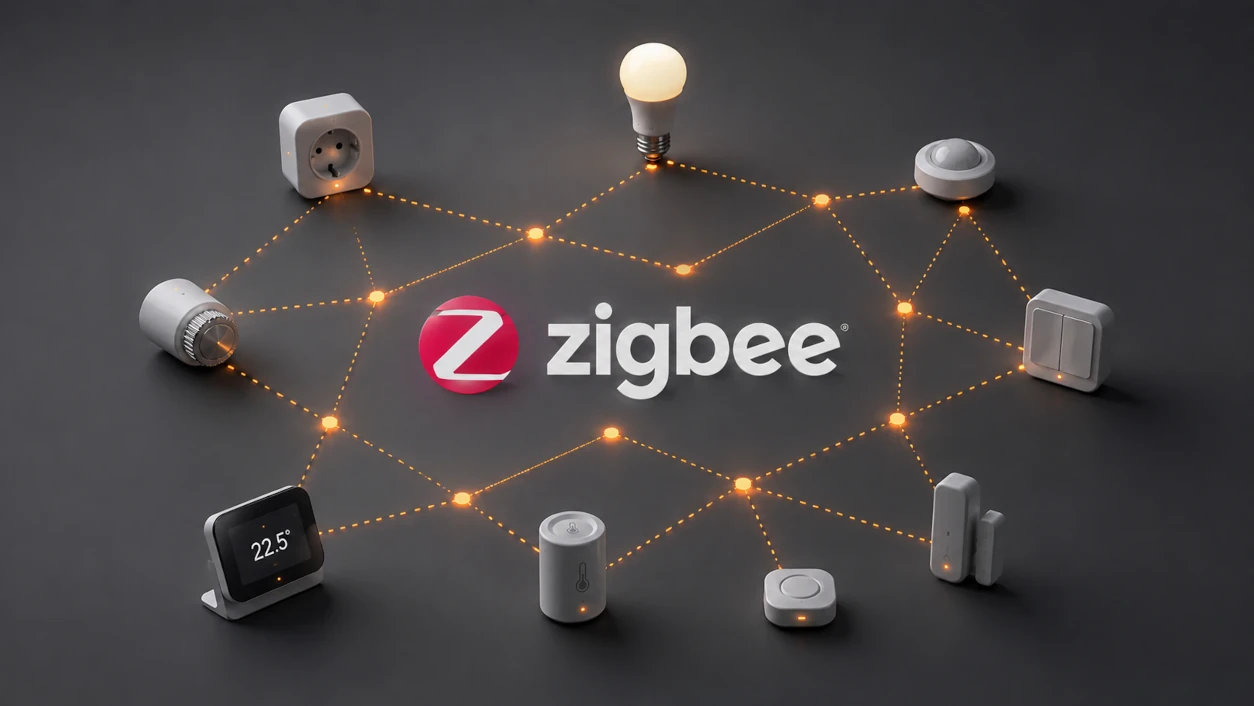
Zigbee Without (Too Much) Complication
For those in a hurry...
That's the short version.
If those few points are enough for you, you probably already know most of what you need to start using Zigbee without asking yourself too many questions.
If, on the other hand, terms like coordinator, router, end device or mesh still feel a little abstract, let's take a look at what's actually behind them.
What exactly is Zigbee?
Zigbee is, first and foremost, a wireless communication technology designed to allow devices to communicate with each other while exchanging relatively small amounts of data and consuming relatively little energy.
And that's already an important difference compared with Wi-Fi.
When I connect my computer or phone to the Wi-Fi network at home, I get a connection capable of moving large amounts of data very quickly. That's quite useful for watching a video, downloading a file or loading a web page.
A door sensor has considerably more modest ambitions.
Most of the time, it has absolutely nothing to say. And when the door opens, its message could practically be reduced to:
"Open."
Then, a few seconds later:
"Closed."
Not exactly something that requires several hundred megabits per second.
In home automation, many devices have exactly this kind of requirement: transmitting small amounts of information, sometimes only occasionally, while consuming as little energy as possible.
That's precisely the kind of situation where Zigbee becomes interesting.
But Zigbee has another characteristic that quickly becomes important once you start installing several devices around a house:
not every device necessarily has to communicate directly with the coordinator.
And that's where this whole mesh network business comes in.
Coordinators, routers and end devices
To understand how a Zigbee network works, we first need to distinguish between the three roles devices can play within it: coordinator, router and end device.
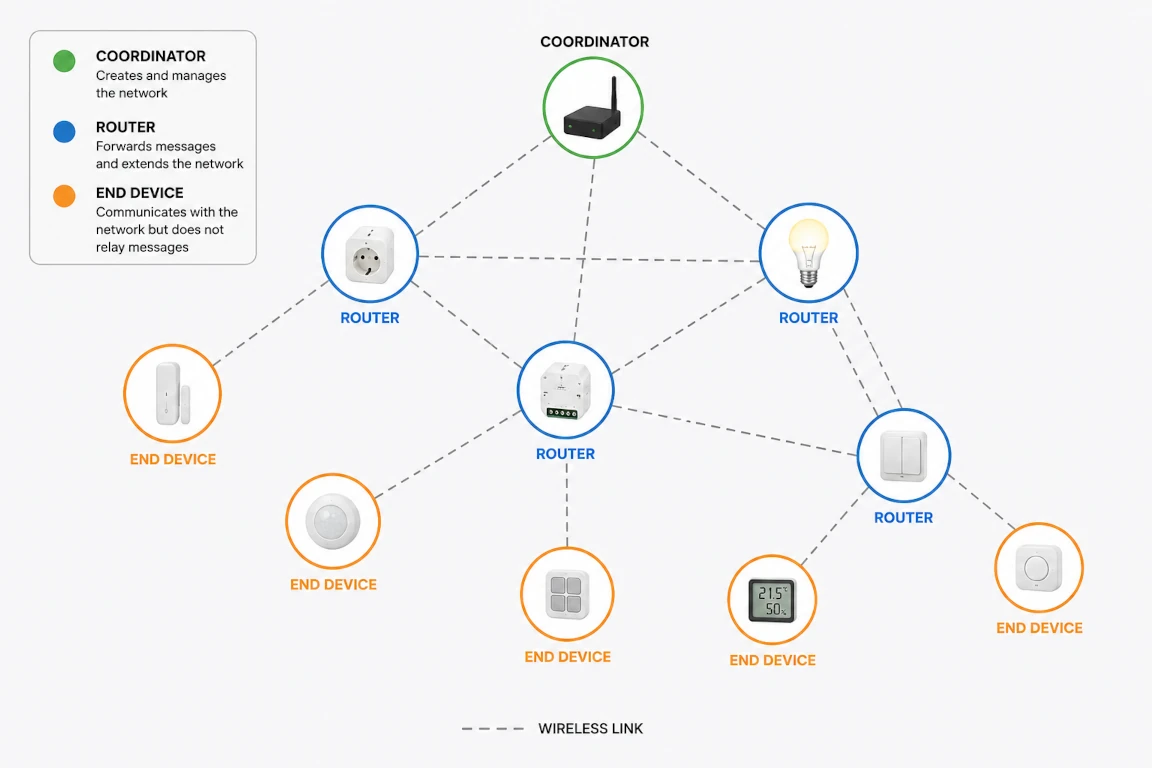
The names may sound a little technical, but the principle is actually quite simple.
The coordinator: you have to start somewhere
A Zigbee network has one coordinator.
It creates the network and allows other devices to join it. That gives it a special role: without a coordinator, there is no Zigbee network.
In a home automation setup, it often takes the form of a radio adapter — such as a USB dongle — associated with the software responsible for managing the network.
When I started, that distinction had completely escaped me. As far as I was concerned, the dongle was basically:
"the USB thing that lets Home Assistant talk to Zigbee."
And, as a starting point, that definition wasn't actually too bad.
The coordinator isn't simply an antenna, though. It participates in creating and operating the network to which the Zigbee devices belong.
And contrary to what the word coordinator might suggest, that doesn't mean every communication has to pass directly through it all the time.
That's where routers come in.
Routers: the ones that pass the message along
A Zigbee router is a device that can communicate with other devices on the network, but can also relay communications.
Imagine a sensor located too far away from the coordinator to communicate with it directly.
If there are one or more suitably placed routers between them, the message can take another path:
sensor → router → router → coordinator
This mechanism allows a Zigbee network to extend beyond the coordinator's direct radio range.
And importantly, these routers don't necessarily have to be dedicated boxes installed specifically for that purpose.
A smart plug, a light bulb, a lighting module or another Zigbee device can also act as a router if the manufacturer designed it to do so.
That's an important point: a device's role in the network depends on its design, not simply on its apparent function.
A smart plug can therefore be both... a smart plug and part of the infrastructure of your Zigbee network.
End devices: they're just here to talk
Finally, there are the end devices.
They also join the Zigbee network and communicate with the other components they need, but they don't relay communications for other devices.
A motion detector, button, temperature sensor or door contact can, for example, operate as an end device.
They use the network.
They don't build the network around themselves.
This distinction has a fairly important practical consequence.
Adding ten end devices to an area with poor Zigbee coverage won't necessarily improve that coverage. You'll simply have added ten more devices trying to use the network.
Adding a few carefully placed routers, on the other hand, can completely change the situation.
And that's where we really begin to understand what mesh network means.
The mesh: not everyone talks directly to the coordinator
We've already seen the basic principle: on a Zigbee network, not every device needs to be within direct range of the coordinator.
Routers can relay communications, allowing a more distant device to reach the rest of the network through one or more intermediate devices.
That's what gives Zigbee its mesh network architecture.
And it changes the way we think about range.
The question is no longer simply:
"Can my coordinator reach that far?"
But rather:
"Can my Zigbee network reach that far?"
A coordinator may be completely unable to communicate directly with a device at the other end of the house. If suitably distributed routers can provide a path between the two, that's not necessarily a problem.
Conversely, a coordinator with excellent range isn't necessarily enough on its own to build a good network throughout an entire house.
The network gradually develops around the devices capable of relaying communications.
This leads to a rather interesting consequence:
adding certain devices can also improve the network itself.
A smart plug, bulb or module acting as a router doesn't just add a new function. It can also provide new paths for other devices on the network.
And those paths aren't necessarily fixed forever. The network has mechanisms that allow it to adapt as its topology changes.
Adding or moving certain devices can therefore gradually change the mesh.
That's also what makes it possible to start with a fairly modest Zigbee network and extend it later.
The obvious question, then, is which devices will actually participate in that mesh.
And that's where we quickly encounter a common shortcut:
"Mains-powered devices are routers and battery-powered devices are end devices."
That's often a useful first approximation.
But only an approximation.
Mains powered = router and battery powered = end device? Not so fast...
When you start reading about Zigbee, you quickly come across a rule that seems simple:
mains-powered devices are routers, while battery-powered devices are end devices.
It's easy to remember.
And in many cases, that's exactly what you'll observe.
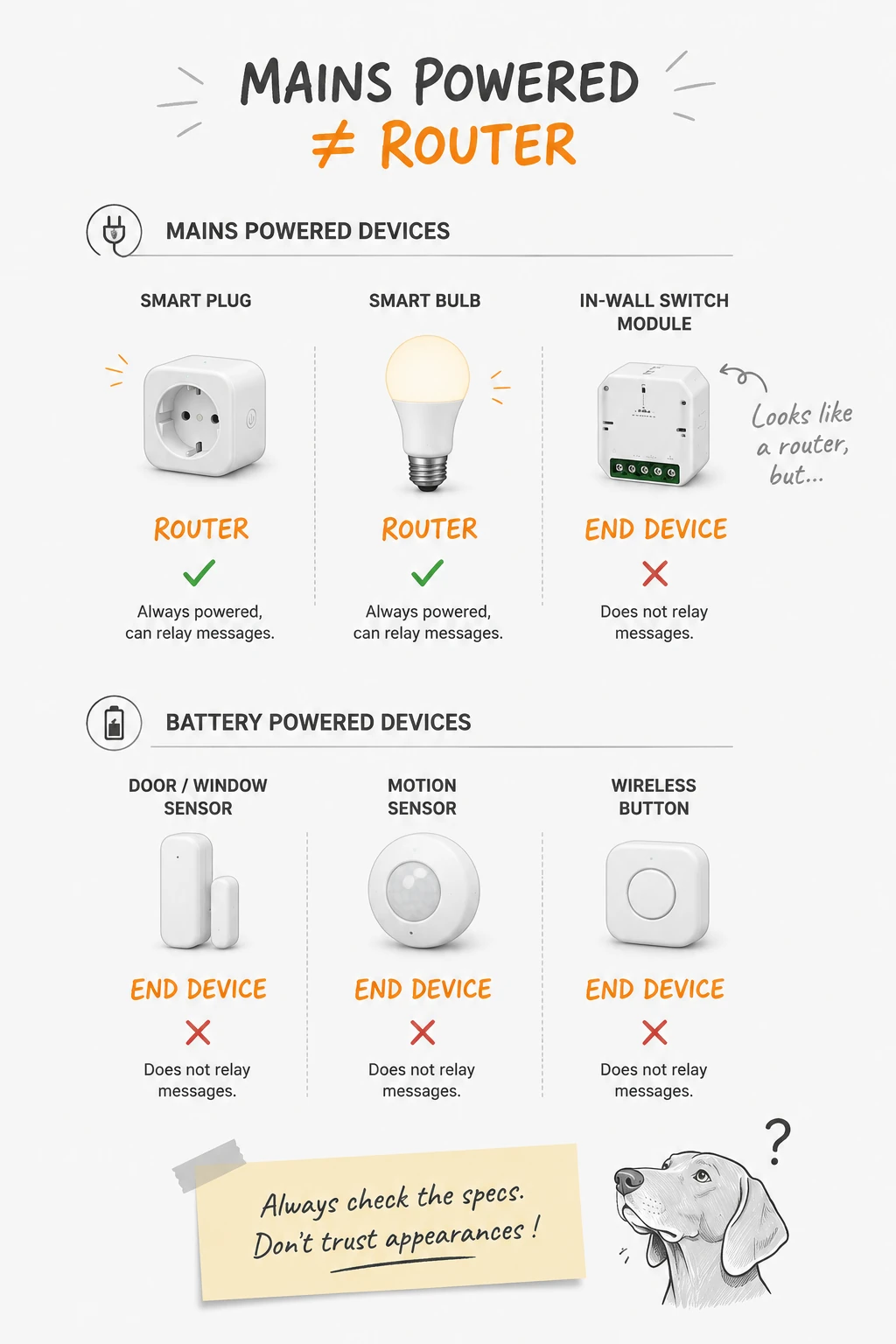
A permanently powered device can remain available to the network and relay messages from other devices. A smart plug or Zigbee bulb is therefore often an excellent candidate to act as a router.
For a small battery-powered sensor expected to run for months, or even years, the situation is different.
One way to reduce its power consumption is precisely not to remain awake continuously. An end device can spend much of its time in a low-power state and wake up when necessary.
Asking it to serve continuously as a relay for other devices would be rather contradictory to that goal.
That's where the shortcut comes from:
mains powered → generally a router
battery powered → generally an end device
The problem is the word "generally."
A mains-powered Zigbee device is not automatically a router.
The role it plays depends on how it was designed. Some permanently powered devices remain end devices and therefore never participate in the mesh.
That's something I discovered, for example, with certain modules designed to be installed behind wall switches.
At first glance, you might naturally think:
"It's in the wall, it controls a light and it's connected to the electrical installation: perfect, that's another Zigbee router."
Not necessarily.
Installing several mains-powered Zigbee devices in one part of the house doesn't therefore automatically mean you've just built a magnificent network of routers there.
For a battery-powered device, on the other hand, assuming it's an end device remains a fairly good rule of thumb.
So the useful rule probably isn't:
"mains powered = router"
but rather:
"if I need this device to strengthen my mesh, I check that it can actually route."
That's not much more complicated.
But first, you need to know that it's something worth checking.
2.4 GHz: Zigbee isn't alone in the room
So far, we've mostly looked at Zigbee as a network: a coordinator, routers, end devices and messages that can travel between them.
But all of this obviously has to communicate over radio.
And Zigbee mainly uses a frequency band we're already very familiar with at home: 2.4 GHz.
You might reasonably wonder why this band is still so widely used.
Modern Wi-Fi networks also use 5 GHz and, in more recent generations, the 6 GHz band. These frequencies provide, among other things, more available spectrum and allow very high data rates.
Yet modern Wi-Fi access points still offer 2.4 GHz as well.
The reason is fairly simple: when it comes to radio, higher frequencies don't only bring advantages.
With comparable power and conditions, lower frequencies generally have more favourable propagation characteristics. Inside a house, 2.4 GHz will therefore often provide better range and pass through certain obstacles more effectively than 5 or 6 GHz.
There's already a trade-off between throughput, available spectrum and propagation.
And for a sensor whose only job is to announce:
"The door is open."
having several hundred megabits per second available isn't particularly useful anyway.
But that naturally leads to another question.
If lower frequencies propagate better, why doesn't Zigbee go even lower?
After all, remote controls, weather stations, sensors and other household devices have been communicating around 433 MHz or 868 MHz in Europe for decades.
And some of those can pass through walls remarkably well.
Why not 433 or 868 MHz?
It's not an unreasonable idea.
Lower frequencies have characteristics that are particularly attractive for devices that need to communicate over some distance while transmitting very little data.
The IEEE 802.15.4 standard, on which Zigbee is based, also provides options in certain sub-GHz bands.
In practice, however, the vast majority of consumer Zigbee devices you'll encounter operate at 2.4 GHz.
Why?
Because a radio frequency is never chosen solely according to how well it can pass through a wall.
You also have to consider available spectrum, possible data rates, regulatory constraints and which bands can be used in different regions of the world.
The bands around 433 and 868 MHz aren't empty radio spaces either. They've long been used by all sorts of short-range devices and, depending on the frequency and application, are subject to different constraints.
The amount of available spectrum is also more limited.
The 2.4 GHz band, on the other hand, has a considerable advantage: it is available for this type of use virtually everywhere in the world.
For a standard intended to be built into millions of devices, being able to use essentially the same radio technology across different markets is obviously useful.
As is often the case with radio, there is no magic frequency.
It's mostly about choosing the best set of compromises.
And the 2.4 GHz compromise has one small drawback of its own: plenty of other technologies made exactly the same choice.
Channels and Wi-Fi
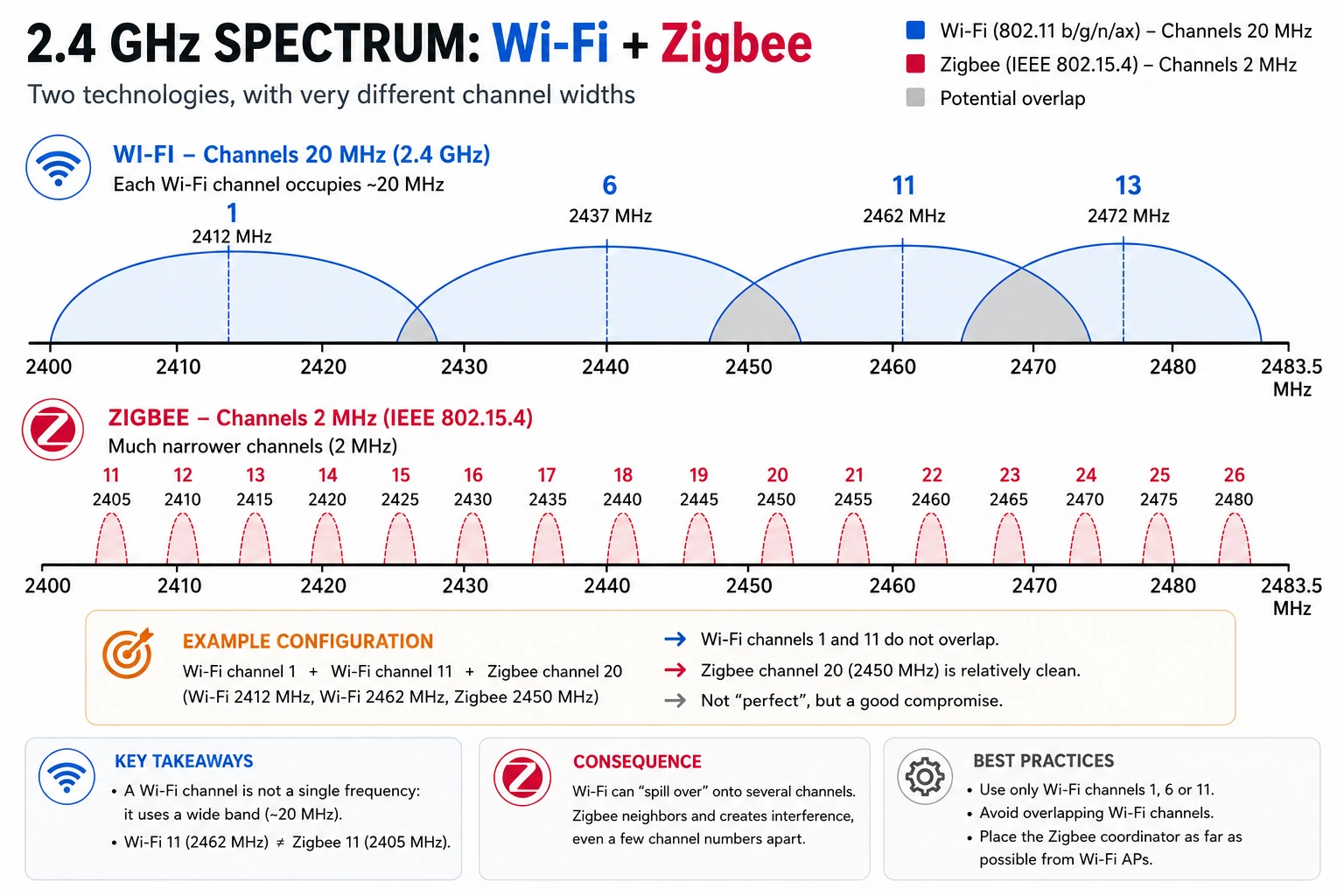
Saying that Zigbee and Wi-Fi both use the 2.4 GHz band obviously doesn't mean they're constantly transmitting on exactly the same frequency.
The band is divided into channels.
We're already familiar with this concept from Wi-Fi. In the 2.4 GHz band, an access point might, for example, use channel 1, 6 or 11.
But there's a small catch.
A channel isn't simply one precise frequency on which all data is transmitted. A transmission occupies a certain width of spectrum around its centre frequency.
Two different channels can therefore partially occupy the same frequencies.
This is particularly obvious with 2.4 GHz Wi-Fi.
Its channels are spaced only 5 MHz apart, while a typical 2.4 GHz Wi-Fi transmission occupies around 20 MHz of bandwidth. Using two different channel numbers therefore doesn't necessarily mean using two independent portions of spectrum.
That's where the familiar recommendation to use Wi-Fi channels 1, 6 and 11 comes from: with a 20 MHz channel width, they allow several networks to be distributed while greatly limiting overlap.
Zigbee divides the same band differently.
At 2.4 GHz, it uses channels 11 through 26, which are much narrower and have centre frequencies spaced 5 MHz apart.
And beware of a fairly natural source of confusion:
Zigbee channel 11 has absolutely nothing to do with Wi-Fi channel 11.
The two technologies use their own numbering systems.
The problem then becomes fairly easy to visualise.
A relatively wide Wi-Fi channel can overlap the frequencies used by several much narrower Zigbee channels.
A Zigbee network can therefore work perfectly well alongside a 2.4 GHz Wi-Fi network, but some channel choices will leave them more room to coexist than others.
There is, however, no universally perfect Zigbee channel.
It all depends on the local radio environment.
You need to consider your own Wi-Fi, but also remember that your neighbours' networks are part of that environment too.
In a detached house, things may be relatively straightforward.
In an apartment surrounded by fifteen Wi-Fi networks, things may be a little more... lively.
That doesn't mean you need to pull out a spectrum analyser before installing your first Zigbee bulb.
But if you're building a large network, or experiencing reliability problems, looking at which channels are actually being used around you can save a lot of time spent investigating the wrong thing.
It can be tempting to search online for "the best Zigbee channel" and simply apply whatever answer comes back.
You'll often see recommendations such as channels 15, 20 or 25.
Those recommendations aren't arbitrary, but they don't know how your Wi-Fi is configured — or your neighbours' Wi-Fi.
It's better to understand the principle than memorise a number.
An application such as WiFiman, for example, provides a fairly simple way to visualise detected Wi-Fi networks, the bands and channels they use, and their signal levels.
After the explanations above, the graphs provided by this kind of tool also become much easier to understand. You can quickly see whether several networks are occupying the same part of the 2.4 GHz band and identify areas that appear less congested.
WiFiman can go much further when analysing a Wi-Fi network, but that's another subject.
Here, all we're interested in is understanding who our Zigbee network will have to share the 2.4 GHz band with.
It obviously isn't a true spectrum analyser: the application can't show everything that might be transmitting or generating noise in that band.
But for getting a quick first picture of the surrounding Wi-Fi environment, it's already more than enough.
Coordinator placement
You can carefully choose your Zigbee channel, install several routers and still start out with a small handicap that's fairly easy to avoid:
putting the coordinator in the wrong place.
And when it takes the form of a USB adapter connected to a computer, Raspberry Pi or server, the wrong place can sometimes be precisely the one that seems most obvious:
directly in the machine's USB port.
That obviously works in plenty of installations. But a computer isn't necessarily the ideal neighbour for a small 2.4 GHz radio transceiver.
Metal cases, cables, power supplies, other radio interfaces and the surrounding electronics already make for a fairly busy environment.
There's also one slightly more surprising neighbour: USB 3.x.
The high-speed signalling used by USB 3 can generate electromagnetic noise in part of the spectrum we're interested in here. In some configurations, a 2.4 GHz radio adapter placed directly next to a USB 3 port, cable or peripheral can therefore experience degraded reception conditions.
Fortunately, the solution is much less impressive than the explanation:
a simple USB extension cable can already make a significant difference.
It allows the coordinator to be moved away from the machine, its ports and its cables, while also giving you more freedom to place it somewhere more favourable.
The main idea is simply to avoid a few obviously poor situations:
- enclosing the coordinator inside a metal cabinet;
- wedging it behind a server surrounded by cables;
- placing it right next to a Wi-Fi access point;
- leaving it pressed against USB 3 peripherals when it could easily be moved away;
- or, more generally, surrounding its tiny antenna with metal and electronics and then wondering why it isn't particularly happy.
We should also remember what we've already seen about the mesh.
The coordinator doesn't need to be placed in the centre of the house or directly reach every Zigbee device.
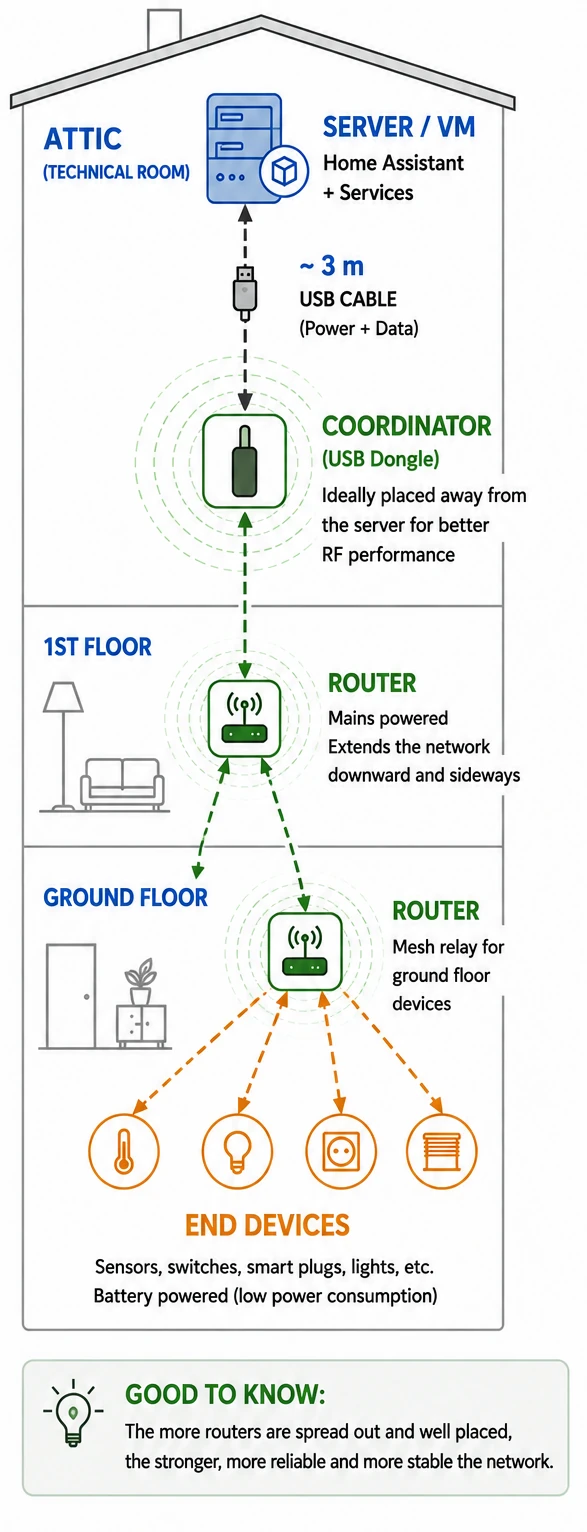
My own setup is actually a fairly good example.
My server is in the attic. Among other things, it hosts the virtual machine running Home Assistant. My Zigbee coordinator is therefore also in the attic, positioned about three metres away from the server using a USB cable.
That's quite a long way from carefully placing the coordinator at the geometric centre of the house.
And yet, it isn't really a problem.
The coordinator obviously needs to communicate reliably with part of the network. From there, routers can take over and progressively extend the mesh into other parts of the house.
That's precisely one of the advantages of a mesh.
Finding a reasonably open location, moving the coordinator away from potential sources of interference and making sure it can communicate properly with the first routers is therefore generally much more relevant than trying to find the exact centre of the house.
In my case, the three metres of USB cable mainly help move the dongle away from the server and all the electronics surrounding it.
And for anyone wondering how a dongle physically connected to a server can be used by Home Assistant running inside a virtual machine: that's done using something called USB passthrough.
But that's another drawer.
Zigbee compatible with Zigbee... usually
At this point, you could reasonably expect things to become simple.
Zigbee is a standard. I have a Zigbee coordinator. I buy a device carrying the Zigbee logo.
I add it to the network and it works.
In an ideal world, we could probably end this section right here.
In the real world, fortunately, it often is that simple... but not always.
Zigbee provides a common foundation that allows devices to join a network, communicate and describe a number of functions: a light, a switch, a temperature, a battery level, and so on.
But manufacturers also have some freedom in the way their devices are designed and expose their capabilities.
Some use entirely standard functions. Others add their own peculiarities or behaviours.
So a device may join a Zigbee network perfectly well, while the software managing it doesn't yet understand everything it's trying to say.
One device may be recognised immediately with all its functions.
Another may work, but only expose some of its capabilities.
And a third may require explicit support for that particular model.
That's a fairly important distinction:
being able to communicate over Zigbee doesn't guarantee that every feature of a device will automatically be understood.
Before buying a slightly unusual device, checking that it's properly supported by the solution you're using can therefore avoid a few surprises.
That doesn't mean you now need to compulsively check every light bulb before buying it.
For many common devices, everything will work exactly as expected.
But when a manufacturer offers an unusual feature, a device has only just reached the market, or you specifically want to use it without the manufacturer's gateway, a quick look at a compatibility list can be an excellent idea.
There's another detail that can be confusing when looking at product packaging.
Many manufacturers sell their Zigbee devices with their own gateway and naturally state that it is required to use their ecosystem.
That doesn't necessarily mean the device is technically incapable of joining another Zigbee network.
With a generic coordinator and a compatible solution, many of these devices can be used directly without the manufacturer's gateway.
But again, "many" doesn't mean "all, with every feature and in every situation."
Some features may depend on manufacturer-specific behaviour, and certain operations, such as firmware updates, may also require a little more attention.
So the sensible approach remains fairly simple:
check before buying.
Not because Zigbee is some gigantic minefield.
Simply because a common logo doesn't necessarily tell the whole story.
What about Thread and Matter?
At this point, it's difficult to talk about home automation without also coming across the names Thread and Matter.
And it's fairly easy to mix everything up.
One relatively simple way to understand the difference is to look at what Zigbee already does.
Simplifying things considerably, Zigbee provides both the mechanisms used to build the network between devices and an application layer that allows those devices to describe their functions and communicate.
With Thread and Matter, those two responsibilities are more clearly separated.
Thread handles the network.
It allows devices to form an IP-based mesh network. Like Zigbee, it relies on IEEE 802.15.4 and generally uses the 2.4 GHz band.
Matter handles the application layer.
It defines a common way to represent and control devices: a light, a smart plug, a sensor, a lock, and so on.
So, very roughly, we could summarise it as:
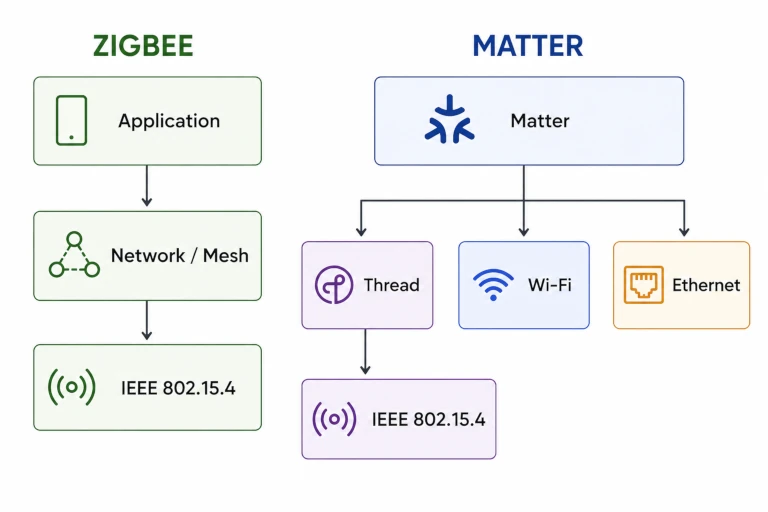
Zigbee ≈ network + device language
whereas:
Thread + Matter ≈ network + device language
But there's an important limitation to that comparison.
Matter isn't tied to Thread.
A Matter device can communicate over Thread, but Matter can also operate over Wi-Fi or Ethernet.
Thread and Matter therefore aren't two inseparable pieces of some new Zigbee. They're two separate technologies that can be used together.
And Thread shares one characteristic with Zigbee that we're now very familiar with: its radio network also uses the 2.4 GHz band.
So all our previous considerations about the radio environment don't magically disappear with Thread.
For someone getting started today, the important thing is probably to remember this:
Zigbee, Thread and Matter aren't simply three competing protocols. They operate at different levels.
And we'll stop there.
Because properly understanding Thread, Matter, Border Routers and how all of this connects to an IP network...
...clearly deserves another drawer.
Do you need to plan everything before you start?
When I installed my first Zigbee devices, I certainly didn't know everything I've just explained in this article.
And it worked.
That's probably the most important thing to remember.
Understanding the role of the coordinator, knowing that some devices participate in the mesh, avoiding a particularly hostile radio environment for your dongle and taking a quick look at device compatibility before buying already helps avoid a few easy mistakes.
For everything else, a Zigbee network can generally evolve.
You can add routers, gradually improve coverage, move the coordinator, reconsider certain choices or replace hardware as the installation grows.
So there's no need to design the perfect network before connecting your first device.
And that's probably a good thing.
Because if I'd had to understand all of this before ordering my first Zigbee modules, I might still be choosing my channel.
At the time, my reasoning was considerably simpler:
"Zigbee? What's this thing now?"
I had a few modules on order, a USB dongle to install and no very clear idea where any of this was going to lead.
Since then, I've learned a thing or two.
Well... hopefully enough to use Zigbee without making life too complicated.
Comments
No comments yet.
Add a comment